
Nissan Juke Owners Manual : Operating range for engine start function
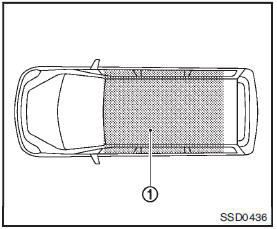
The Intelligent Key can only be used for starting the engine when the Intelligent Key is within the specified operating range1 .
When the Intelligent Key battery is almost discharged or strong radio waves are present near the operating location, the Intelligent Key system’s operating range becomes narrower and may not function properly.
If the Intelligent Key is within the operating range, it is possible for anyone, even someone who does not carry the Intelligent Key, to push the ignition switch to start the engine.
• The cargo room area is not included in the operating range but the Intelligent Key may function.
• If the Intelligent Key is placed on the instrument panel, inside the glove box or door pocket, the Intelligent Key may not function.
• If the Intelligent Key is placed near the door or window outside the vehicle, the Intelligent Key may function.
 Push-button ignition switch (models with Intelligent Key system)
WARNING
Do not operate the push-button ignition switch while driving the vehicle except
in an emergency. (The engine will stop when the ignition switch is pushed 3 consecutive
times or the igniti ...
 Push-button ignition switch operation
When the ignition switch is pushed without depressing the brake pedal (Continuously
Variable Transmission models) or the clutch pedal (manual transmission models),
the ignition switch position w ...
Other materials:
Roof side molding
Exploded View
1. Roof side molding
2. Roof side molding clip
3. Double-sided tape [t: 2.5 mm (0.098 in)]
4. Body side outer panel
5. Roof panel
: Vehicle front
: Do not reuse
Removal and Installation
REMOVAL
ROOF SIDE MODLDING
1. Disengage roof side molding rear side fixing clip, usi ...
Combination switch
Exploded View
1. Combination switch
2. Combination switch connector
Removal and Installation
REMOVAL
1. Remove steering column cover. Refer to IP-13, "Removal and
Installation".
2. Remove screws.
3. Disconnect the connector.
4. Pull up the combination switch to remove it.
I ...
Oil pan
Exploded View
1. Transaxle assembly
2. Oil pan gasket
3. Magnet
4. Oil pan
5. Overflow tube
6. Drain plug gasket
7. Drain plug
8. Oil pan fitting bolt
: Always replace after every
disassembly.
: N·m (kg-m, ft-lb)
: N·m (kg-m, it-lb)
Removal and Installation
REMOVAL
1. Remove ...
