
Nissan Juke Service and Repair Manual : MR16DDT : Removal and Installation
REMOVAL
1. Disconnect the battery cable from the negative terminal. Refer to PG-124, "Removal and Installation".
2. Drain engine coolant from radiator. Refer to CO-11, "Draining".
3. Remove charge air cooler. Refer to EM-31, "Removal and Installation".
4. Remove CVT water hose A on thermostat housing side (CVT models). Refer to CO-17, "Exploded View".
5. Remove radiator hose (lower) on thermostat housing side. Refer to CO-17, "Removal and Installation".
6. Move CVT water hose A and radiator hose (lower) to a location where they do not inhibit work.
7. Open “B� terminal cover, in the direction indicated by an arrow, as shown in the figure.
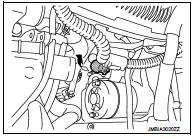
8. Remove “B� terminal nut and “B� terminal harness.
9. Remove “S� terminal nut and “S� terminal harness.
10. Disconnect harness connector (1) from crankshaft position sensor.
11. Remove harness fixing clip (A) from oil pan (upper), and then move harness (2) to a location where they do not inhibit work.
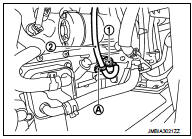
12. Remove starter motor mounting bolts.
13. Remove starter motor forward from the vehicle.
INSTALLATION
Note the following items, and install in the reverse order of removal.
CAUTION:
• Be careful to tighten “B� terminal nut to the specified torque.
• After work is complete fill engine coolant. Refer to CO-12, "Refilling".
 MR16DDT : Exploded View
REMOVAL
1. “S� terminal harness
2. “B� terminal harness
3. Starter motor
4. Cylinder block
: Vehicle front
: N·m (kg-m, in-lb)
: N·m (kg-m, ft-lb)
DISASSEMBLY
Type: S114-902
...
 MR16DDT : Inspection and Adjustment
INSPECTION
Magnetic Switch Check
• Before starting to check, disconnect the battery cable from the negative
terminal.
• Disconnect “M� terminal of starter motor.
1. Continuity test [be ...
Other materials:
Stall test
Inspection and Judgment
INSPECTION
1. Inspect the amount of engine oil. Replenish the engine oil if necessary.
2. Drive for about 10 minutes to warm up the vehicle so that the
CVT fluid temperature is 50 to 80°C (122 to 176°F). Inspect the
amount of CVT fluid. Replenish if necessary.
3. Se ...
Service data and specifications (SDS)
Wheel Bearing
Drive Shaft
2WD
*: For measuring position, refer to FAX-26, "WHEEL SIDE : Disassembly and
Assembly" (Wheel side), FAX-
29, "TRANSAXLE SIDE : Disassembly and Assembly" (Transaxle side).
4WD
*: For measuring position, refer to FAX-26, "WHEEL SIDE : ...
Power meter
This dynamic gauge provides a clear visual representation of your Nissan Leaf's energy flow. It specifically monitors the actual traction motor power consumption (A) and tracks the regenerative braking energy that is being fed back into the Li-ion battery (B).
When the veh ...
