
Nissan Juke Service and Repair Manual : Removal and installation
POWER SOCKET
Exploded View
1 : Inner socket
2 : Ring
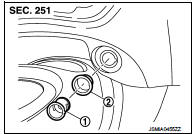
Removal and Installation
REMOVAL
1. Remove cluster tray. Refer to IP-13, "Removal and Installation".
2. Pull out inner socket (1) by pushing the pawl (B) of the ring (2) from the inner socket hole (square) (A).
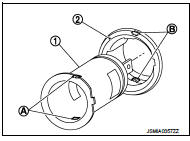
3. Press the ring pawl from the back of the cluster tray to remove the ring.
 : Pawl
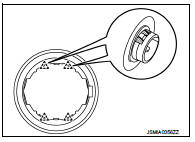
INSTALLATION
Note the following, and install in the reverse order of removal.
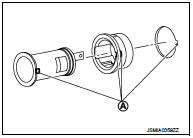
Align the cut outs of inner socket, ring and cluster tray.
A : Cut out
 Wiring diagram
POWER SOCKET
Wiring Diagram
For connector terminal arrangements, harness layouts, and alphabets in a
(option abbreviation; if not
described in wiring diagram), refer to GI-12, "Connector Inf ...

Other materials:
Wiring diagram
HORN
Wiring Diagram
For connector terminal arrangements, harness layouts, and alphabets in a
(option abbreviation; if not
described in wiring diagram), refer to GI-12, "Connector Information/Explanation
of Option Abbreviation".
...
Precaution for Supplemental Restraint System (SRS) "AIR BAG" and "SEAT BELT
PRE-TENSIONER"
The Supplemental Restraint System such as “AIR BAG� and “SEAT BELT PRE-TENSIONER�,
used along
with a front seat belt, helps to reduce the risk or severity of injury to the
driver and front passenger for certain
types of collision. Information necessary to service the system safely is
...
Fluid cooler system
Exploded View
1. Copper washer
2. CVT fluid cooler tube
3. Hose clamp
4. Fluid cooler hose A
5. Fluid cooler tube
6. Fluid cooler hose B
7. Fluid cooler hose C
8. Transaxle assembly
9. Fluid cooler hose D
10. Fluid cooler hose E
11. Fluid cooler hose F
12. Bypass valve
13. Flu ...
