
Nissan Leaf 2018-2025 (ZE1) Owner's Manual : Moving Object Detection (MOD)
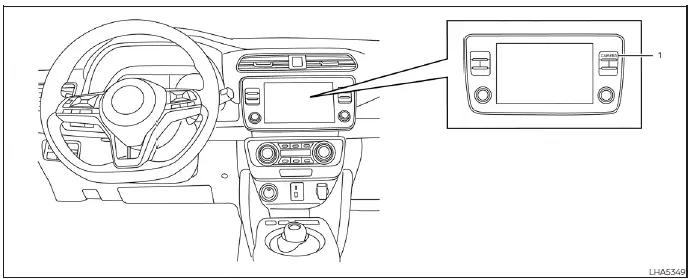
- CAMERA button (conveniently mounted on the physical display bezel assembly to activate or toggle camera modes)
WARNING
Failure to strictly follow the safety warnings and operational instructions for the correct use of the Moving Object Detection (MOD) system could cause surrounding hazards to be missed, resulting in serious property damage, severe personal injury, or death.
- The advanced MOD system is engineered strictly as a driver convenience feature; it is not a safe substitute for proper, attentive vehicle operation and is not physically designed or capable of automatically preventing structural contact with hazards or obstacles surrounding the vehicle body. When maneuvering your Nissan Leaf, always actively use your physical outside side view mirrors and center interior rearview mirror, and physically turn your head to check your blind spots to ensure it is completely safe to complete the maneuver.
- The active monitoring system is automatically deactivated at forward or reverse speeds above 5 mph (8 km/h) to avoid processing overhead. It is instantly reactivated as your velocity decreases below lower threshold speeds.
- The image processing algorithm of the MOD system is designed specifically to track kinetic movement and is not engineered to detect surrounding stationary objects, parked vehicles, or structural walls.
The highly intelligent MOD system is capable of informing the driver of close-range moving objects near the vehicle parameters when carefully backing out of tight residential garages, maneuvering through busy shopping parking lots, and navigating other low-speed urban instances.
The responsive MOD system detects kinetic moving objects within its perimeter by utilizing real-time image processing technology on the live composite video stream shown on the dashboard display panel.
 Intelligent Around View Monitor
system limitations
Intelligent Around View Monitor
system limitations
WARNING
Listed below are the vital engineering system limitations for the Intelligent Around View Monitor.
Failure to operate your vehicle in strict accordance wi ...
 MOD system operation
The specialized MOD system will automatically turn on and begin scanning your surroundings under the following precise operational conditions:
When the electronic shift selector lever i ...
Other materials:
P0087, P0088, P0090 FRP control system
DTC Logic
DTC DETECTION LOGIC
NOTE:
• If DTC P0087 or P0090 is displayed with DTC P1197, first perform the trouble
diagnosis for DTC
P1197.
• DTC P0087 or P0090 may be displayed when running out of gas.
DTC CONFIRMATION PROCEDURE
1.PRECONDITIONING
If DTC Confirmation Procedure has be ...
Intelligent key battery
Removal and Installation
1. Release the lock knob at the back of the Intelligent Key and remove the
mechanical key.
2. Insert a flat-blade screwdriver (A) wrapped with a cloth into the
slit of the corner and twist it to separate the upper part from the
lower part.
CAUTION:
• Do not touch ...
P1805 brake switch
DTC Logic
DTC DETECTION LOGIC
DTC CONFIRMATION PROCEDURE
1.PERFORM DTC CONFIRMATION PROCEDURE
1. Turn ignition switch ON.
2. Fully depress the brake pedal for at least 5 seconds.
3. Erase DTC.
4. Check 1st trip DTC.
Is 1st trip DTC detected?
YES >> Go to EC-734, "Diagnosis Pr ...
