
Nissan Leaf 2018-2025 (ZE1) Owner's Manual : MOD system operation
The specialized MOD system will automatically turn on and begin scanning your surroundings under the following precise operational conditions:
- When the electronic shift selector lever is actively placed in the R (Reverse) position.
- When the overall vehicle speed decreases below approximately 5 mph (8 km/h) while a camera stream view is actively displayed on the infotainment console.
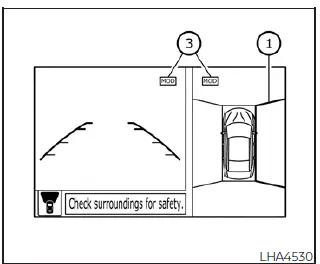
Front and bird's-eye views
The intelligent MOD system operates reliably under the following specific parameters whenever an active camera perspective is pulled up on the central screen:
- When the electronic shift selector sits in either the P (Park) or N (Neutral) position and the vehicle is fully stopped, the MOD system continuously scans for moving objects inside the overhead bird's-eye view quadrant. Note that the MOD tracking system may not operate correctly if the power outside mirrors are actively folding in or out, remain in their fully stowed position, or if either primary front door is unlatched and opened.
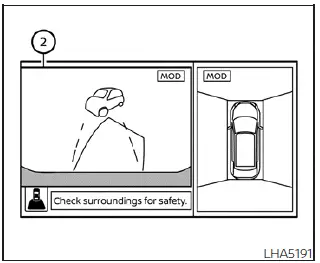
Rear and bird's-eye views
- When the electronic shift selector is moved into the D (Drive) position and your vehicle speed is maintained below approximately 5 mph (8 km/h), the MOD system actively monitors for crossing hazards across the front view display area.
- When the electronic shift selector lever is held in the R (Reverse) position and your vehicle speed remains below approximately 5 mph (8 km/h), the MOD system dynamically scans for moving targets behind the rear bumper structure. The MOD system will be forced to shut down and will not operate if the rear hatch assembly is open or improperly latched.
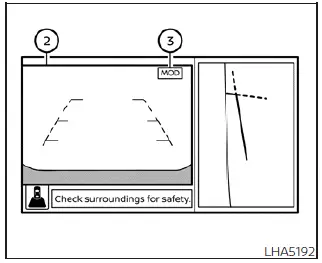
Rear and front-side views
Please note that the MOD system does not detect moving objects or track motion profiles inside the front-side wheel view area. Consequently, the specialized graphic MOD status icon will not be displayed anywhere on the dashboard screen when this passenger-side clearance view is active.
The exact moment the active MOD system detects an approaching moving object or pedestrian near the vehicle perimeter, an audible warning chime will sound inside the cabin and a distinct yellow highlight frame will overlay the specific camera quadrant where the moving target was caught. While the internal image processor continues to track the moving objects, this yellow safety frame will continue to flash and remain displayed over that view sector.
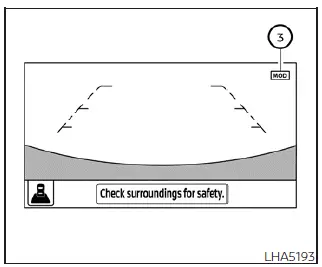
Full screen rear view
NOTE:
To prevent confusing audio alerts inside your Nissan Leaf, the MOD system is programmed to remain silent and will not sound its chime while the Rear Cross Traffic Alert system chime is actively beeping.
When operating within the composite bird's-eye view layout, a yellow safety frame 1 is instantly generated over the corresponding camera quadrant (front, rear, right, or left side feeds) depending on exactly where the approaching moving objects are detected.
A matching yellow indicator frame 2 is mirrored and displayed directly across the primary view panel when operating in either the dedicated front view or standard rear view monitoring modes.
A bright blue MOD icon 3 is displayed in the corner of the camera quadrant where the MOD feature is currently active and scanning. A solid gray MOD icon is displayed instead within any camera view sector where the MOD tracking functions are currently disabled or non-operative.
If the entire MOD software module has been manually disabled in the vehicle settings menu, the graphic MOD icon 3 will not be displayed on the multimedia console screen at all.
Turning MOD ON and OFF
Depending on the specific trim package of your Nissan Leaf, the option is integrated to allow the driver to manually toggle the MOD tracking system ON or OFF directly within the digital vehicle information display cluster.
To change the operational status and turn the MOD system on or off, follow these steps:
1. Press and use either the left arrow
 or the right arrow
 menu control switches located on the left side of the steering wheel spoke assembly to navigate through the cluster menus until you highlight the "Settings" gear icon.
2. Scroll down to highlight the "Driver Assistance" sub-menu line and press the physical OK button on the steering wheel.
3. Scroll down to select the "Parking Aids" configuration block and press the center OK button once more.
4. Scroll down to highlight the "Moving Object" feature line and press the OK button to toggle the system selection ON or OFF according to your driving preference.
 Moving Object Detection (MOD)
CAMERA button (conveniently mounted on the physical display bezel assembly to activate or toggle camera modes)
WARNING
Failure to strictly follow the sa ...
 MOD system limitations
WARNING
The following list outlines the technical system limitations for the Moving Object Detection (MOD) feature integrated into your Nissan Leaf. Failure to operate the vehicle in full accorda ...
Other materials:
Battery terminal with fusible link
Exploded View
1 : Battery terminal with fusible link
2 : Harness connector
: N·m (kg-m, ft-lb)
Removal and Installation
REMOVAL
1. Disconnect the battery cable from the negative terminal.
2. Remove cover of battery positive terminal.
3. Remove harness mounting nut and battery terminal wit ...
Chassis control
The chassis control module is a sophisticated electronic system integrated into the Nissan Leaf designed to enhance both vehicle stability and occupant comfort through the following primary functions:
Intelligent Trace Control (I-TC)
Active Ride Control (ARC)
Intel ...
Heated seat switches
Front
To ensure maximum comfort during colder weather, the front seats and the available rear outboard seats in your Nissan Leaf are equipped with sophisticated built-in heating elements. The control switches, conveniently located on the center console and positioned a ...
