
Nissan Leaf 2018-2025 (ZE1) Owner's Manual : MOD system limitations
WARNING
The following list outlines the technical system limitations for the Moving Object Detection (MOD) feature integrated into your Nissan Leaf. Failure to operate the vehicle in full accordance with these operational limitations could blind the driver to surrounding hazards, resulting in serious injury or death.
- Excessive cabin or exterior noise—such as high audio system volume or driving with the windows fully open—will significantly interfere with the audible chime alert, making it highly likely that the warning will not be heard by the driver.
- The overall performance and detection accuracy of the MOD system in your Nissan Leaf will be inherently limited by specific environmental conditions and the visual characteristics of surrounding objects, including:
- Situations where there is low visual contrast between the background environment and the moving objects.
- Instances where there is a rapidly blinking or strobe-like source of light that confuses the image processor.
- When intense, high-intensity light sources—such as direct sunlight or the high-beam headlights of another vehicle—shine directly into the camera apertures.
- When the camera orientation is physically altered from its factory-calibrated position, such as when the side mirrors are folded inward.
- When the optical clarity of the camera lens is compromised by road dirt, mud, water droplets, or accumulated snow.
- When the perceived position of moving objects relative to the vehicle remains static or does not change enough to trigger the detection algorithm.
- The sensitive MOD system algorithm might mistakenly detect and trigger alerts for non-hazardous moving elements, such as flowing water droplets on the lens surface, white steam/smoke from an exhaust pipe, or shifting shadows cast by moving foliage.
- The MOD system may not function with expected reliability depending on the specific speed, vector direction, distance, or complex shape of the moving objects being monitored.
- If your Nissan Leaf sustains physical body damage to the mounting zones where the cameras are installed, resulting in misalignment or bent brackets, the internal sensing zone calibration will be compromised, preventing the MOD system from detecting objects correctly.
- When the ambient temperature is extremely high or low, the responsiveness and clarity of the display screen may decrease temporarily; this behavior is a standard physical characteristic of the display hardware and does not indicate a system malfunction.
The color-coded status icon on the monitor will transition from blue to orange to indicate a system status change if any of the following events have occurred:
- When the MOD system has detected an internal processing malfunction.
- When the internal component temperature reaches a critical high level (in which case the icon will blink to warn the user).
- When the RearView camera has detected an external blockage or obstruction (the icon will blink to notify the driver).
If the icon light remains illuminated in orange after restarting the system, you must have the MOD system professionally inspected. It is strongly recommended that you visit a NISSAN certified LEAF dealer to perform this necessary diagnostic service.
System maintenance
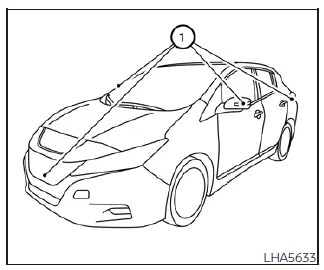
CAUTION
- Do not use aggressive solvents such as alcohol, benzine, or paint thinner to clean the delicate camera lenses. Using these harsh chemicals will cause permanent plastic clouding and surface discoloration.
- Do not physically scratch or damage the camera housings, as any abrasion will permanently degrade the monitor screen image quality and impede detection reliability.
If road grit, heavy rain, or winter snow accumulates on any of the camera lenses, the Intelligent Around View Monitor and MOD systems may struggle to display objects clearly. To ensure safety, carefully clean the camera lens by wiping it with a soft, clean cloth dampened with a highly diluted mild cleaning agent, then follow up by wiping the lens dry with a separate clean, dry cloth.
 MOD system operation
The specialized MOD system will automatically turn on and begin scanning your surroundings under the following precise operational conditions:
When the electronic shift selector lever i ...
 Vents
Vents
Side vent
You can easily open or close the ventilation airflow by moving the integrated vent slide control in the appropriate direction.
: This standard s ...
Other materials:
Diagnosis system (BCM) (with intelligent key system)
Description
Air conditioning system performs self-diagnosis, operation check, function
diagnosis, and various settings
using diagnosis function of each control unit.
Common item : consult-III Function (BCM - COMMON ITEM)
APPLICATION ITEM
CONSULT-III performs the following functions via CAN ...
Locking with power door lock switch
Driver’s armrest
Operating the power door lock switch will lock or unlock all the doors. The switch
is located on the driver’s door armrest.
To lock the doors, push the power door lock switch to the lock position 1 with
the driver’s door open, then close the door.
When locking the doo ...
Precaution for Supplemental Restraint System (SRS) "AIR BAG" and "SEAT BELT
PRE-TENSIONER"
The Supplemental Restraint System such as “AIR BAG� and “SEAT BELT
PRE-TENSIONER�, used along
with a front seat belt, helps to reduce the risk or severity of injury to the
driver and front passenger for certain
types of collision. Information necessary to service the system safely is
...
