
Nissan Leaf 2018-2025 (ZE1) Owner's Manual : Vents
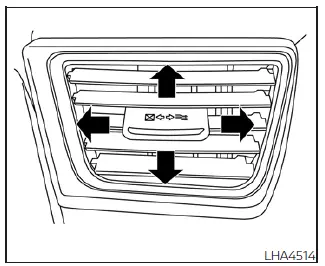
Side vent
You can easily open or close the ventilation airflow by moving the integrated vent slide control in the appropriate direction.
 : This standard symbol indicates that the air vents are currently in the fully closed position.
 : This standard symbol indicates that the air vents are currently open, allowing for maximum cabin airflow.
You can customize the airflow direction coming from the vents by moving the central vent slide control (up/down or left/right) until the air is pointed precisely where you desire.
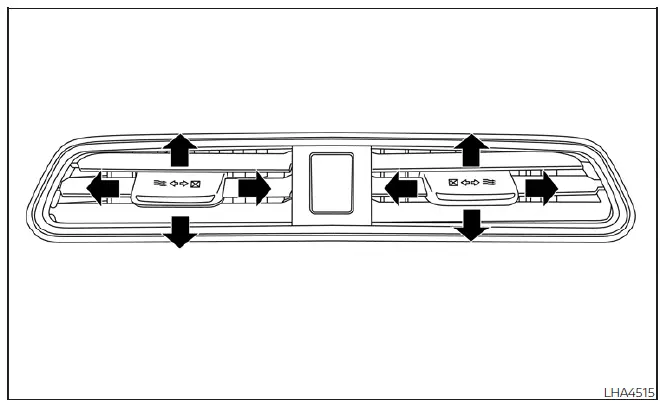
Center Vent
 MOD system limitations
WARNING
The following list outlines the technical system limitations for the Moving Object Detection (MOD) feature integrated into your Nissan Leaf. Failure to operate the vehicle in full accorda ...
 Heater and air conditioner (automatic)
WARNING
The advanced air conditioning cooling function in your Nissan Leaf operates exclusively when the power switch is in the fully active ON position or when the green READY to drive ...
Other materials:
Blower motor
Diagnosis Procedure
1.CHECK SYMPTOM
Check symptom (A or B).
Which symptom is detected?
A >> GO TO 2.
B >> GO TO 7.
2.CHECK FUSE
1. Turn ignition switch OFF.
2. Check 15A fuses (Nos. 14 and 16, located in fuse block (J/B)].
NOTE:
Refer to PG-22, "Fuse, Connector and ...
Precaution Necessary for Steering Wheel Rotation after Battery Disconnect
NOTE:
• Before removing and installing any control units, first turn the ignition
switch to the LOCK position, then disconnect
both battery cables.
• After finishing work, confirm that all control unit connectors are connected
properly, then re-connect both
battery cables.
• Always us ...
P0470 exhaust gas pressure sensor 1
DTC Logic
DTC DETECTION LOGIC
NOTE:
If DTC P0470 is displayed with DTC P0651 or P2263, first perform trouble
diagnosis for DTC P0651 or P2263.
Refer to EC-975, "DTC Logic" (P0651), EC-1003, "DTC Logic" (P2263).
Diagnosis Procedure
1.CHECK GROUND CONNECTIONS
1. Turn i ...
