
Nissan Juke Service and Repair Manual : C1105, C1106, C1107, C1108 wheel sensor
DTC Logic
DTC DETECTION LOGIC
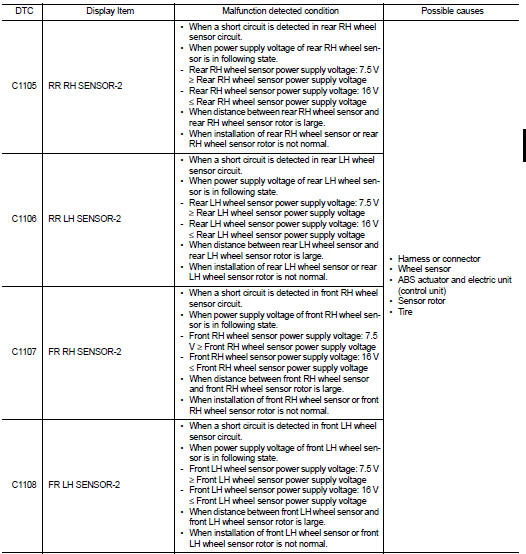
DTC CONFIRMATION PROCEDURE
1.PRECONDITIONING
If “DTC CONFIRMATION PROCEDURE” has been previously conducted, always turn ignition switch OFF and wait at least 10 seconds before conducting the next test.
>> GO TO 2.
2.CHECK DTC DETECTION
 With CONSULT-III.
1. Stat the engine.
2. Drive the vehicle at approx. 30 km/h (19 MPH) or more for approx. 1 minute.
3. Stop the vehicle.
4. Perform self-diagnosis for “ABS”.
Is DTC “C1105”, “C1106”, “C1107” or “C1108” detected? YES >> Proceed to BRC-40, "Diagnosis Procedure".
NO >> INSPECTION END
Diagnosis Procedure
CAUTION:
Never check between wheel sensor harness connector terminals.
1.CHECK ABS ACTUATOR AND ELECTRIC UNIT (CONTROL UNIT) POWER SUPPLY SYSTEM
Check ABS actuator and electric unit (control unit) power supply system. Refer to BRC-64, "Diagnosis Procedure".
Is the inspection result normal? YES >> GO TO 2.
NO >> Repair or replace error-detected parts.
2.CHECK TIRE
1. Turn the ignition switch OFF.
2. Check tire air pressure, wear and size. Refer to WT-9, "Tire Air Pressure".
Is the inspection result normal? YES >> GO TO 5.
NO >> Adjust air pressure or replace tire and GO TO 3.
3.CHECK DATA MONITOR (1)
 With CONSULT-III.
1. Erase Self-diagnosis result for “ABS”.
2. Turn the ignition switch OFF, and wait 10 seconds or more.
3. Stat the engine.
4. Select “ABS” and “DATA MONITOR”, check “FR LH SENSOR”, “FR RH SENSOR”, “RR LH SENSOR” and “RR RH SENSOR”.
NOTE
:
Set the “DATA MONITOR” recording speed to “10 msec”.
5. Read a value (wheel speed) of both normal wheel sensors and error-detecting wheel sensor.
Regarding the deference at 30 km/h (19 MPH) between the wheel speed detected by the error detecting wheel sensor and the maximum/minimum wheel speed detected by the normal wheel sensors, is the difference within 5%, respectively? YES >> GO TO 4.
NO >> GO TO 5.
4.PERFORM SELF-DIAGNOSIS (1)
 With CONSULT-III.
1. Drive the vehicle at approx. 30 km/h (19 MPH) or more for approx. 1 minute.
2. Stop the vehicle.
3. Perform self-diagnosis for “ABS”.
Is DTC “C1105”, “C1106”, “C1107” or “C1108” detected? YES >> GO TO 5.
NO >> INSPECTION END
5.CHECK WHEEL SENSOR
1. Turn the ignition switch OFF.
2. Check wheel sensor for damage.
3. Remove dust and foreign matter adhered to the sensor rotor with a vacuum dust collector through the wheel sensor mounting hole.
CAUTION:
Install wheel sensor with no backlash and float, and tighten the mounting bolt
to the specified
torque.
• Front: Refer to BRC-84, "FRONT WHEEL SENSOR : Exploded View".
• Rear: Refer to BRC-85, "REAR WHEEL SENSOR : Exploded View".
Is the inspection result normal? YES >> GO TO 8.
NO >> GO TO 6.
6.REPLACE WHEEL SENSOR (1)
 With CONSULT-III.
1. Replace wheel sensor.
- Front: Refer to BRC-84, "FRONT WHEEL SENSOR : Removal and Installation".
- Rear: Refer to BRC-86, "REAR WHEEL SENSOR : Removal and Installation".
2. Erase Self-diagnosis result for “ABS”.
3. Turn the ignition switch OFF, and wait 10 seconds or more.
4. Stat the engine.
5. Select “ABS” and “DATA MONITOR”, check “FR LH SENSOR”, “FR RH SENSOR”, “RR LH SENSOR” and “RR RH SENSOR”.
NOTE
:
Set the “DATA MONITOR” recording speed to “10 msec”.
6. Read a value (wheel speed) of both normal wheel sensors and error-detecting wheel sensor.
Regarding the deference at 30 km/h (19 MPH) between the wheel speed detected by the error detecting wheel sensor and the maximum/minimum wheel speed detected by the normal wheel sensors, is the difference within 5%, respectively? YES >> GO TO 7.
NO >> GO TO 19.
7.PERFORM SELF-DIAGNOSIS (2)
 With CONSULT-III.
1. Drive the vehicle at approx. 30 km/h (19 MPH) or more for approx. 1 minute.
2. Stop the vehicle.
3. Perform self-diagnosis for “ABS”.
Is DTC “C1105”, “C1106”, “C1107” or “C1108” detected? YES >> GO TO 19.
NO >> INSPECTION END
8.CHECK CONNECTOR
1. Turn the ignition switch OFF.
2. Check ABS actuator and electric unit (control unit) harness connector for disconnection or looseness.
3. Check wheel sensor harness connector for disconnection or looseness.
Is the inspection result normal? YES >> GO TO 11.
NO >> Repair or replace error-detected parts, securely lock the connector, and GO TO 9.
9.CHECK DATA MONITOR (2)
 With CONSULT-III.
1. Erase Self-diagnosis result for “ABS”.
2. Turn the ignition switch OFF, and wait 10 seconds or more.
3. Stat the engine.
4. Select “ABS” and “DATA MONITOR”, check “FR LH SENSOR”, “FR RH SENSOR”, “RR LH SENSOR” and “RR RH SENSOR”.
NOTE
:
Set the “DATA MONITOR” recording speed to “10 msec”.
5. Read a value (wheel speed) of both normal wheel sensors and error-detecting wheel sensor.
Regarding the deference at 30 km/h (19 MPH) between the wheel speed detected by the error detecting wheel sensor and the maximum/minimum wheel speed detected by the normal wheel sensors, is the difference within 5%, respectively? YES >> GO TO 10.
NO >> GO TO 11.
10.PERFORM SELF-DIAGNOSIS (3)
With CONSULT-III.
1. Drive the vehicle at approx. 30 km/h (19 MPH) or more for approx. 1 minute.
2. Stop the vehicle.
3. Perform self-diagnosis for “ABS”.
Is DTC “C1105”, “C1106”, “C1107” or “C1108” detected? YES >> GO TO 11.
NO >> INSPECTION END
11.CHECK TERMINAL
1. Turn the ignition switch OFF.
2. Disconnect ABS actuator and electric unit (control unit) harness connector and then check ABS actuator and electric unit (control unit) pin terminals for damage or loose connection with harness connector.
3. Disconnect wheel sensor harness connector and check each wheel sensor pin terminals for damage or loose connection with harness connector.
Is the inspection result normal? YES >> GO TO 14.
NO >> Repair or replace error-detected parts and GO TO 12.
12.CHECK DATA MONITOR (3)
With CONSULT-III.
1. Connect ABS actuator and electric unit (control unit) harness connector.
2. Connect wheel sensor harness connector.
3. Erase Self-diagnosis result for “ABS”.
4. Turn the ignition switch OFF, and wait 10 seconds or more.
5. Stat the engine.
6. Select “ABS” and “DATA MONITOR”, check “FR LH SENSOR”, “FR RH SENSOR”, “RR LH SENSOR” and “RR RH SENSOR”.
NOTE
:
Set the “DATA MONITOR” recording speed to “10 msec”.
7. Read a value (wheel speed) of both normal wheel sensors and error-detecting wheel sensor.
Regarding the deference at 30 km/h (19 MPH) between the wheel speed detected by the error detecting wheel sensor and the maximum/minimum wheel speed detected by the normal wheel sensors, is the difference within 5%, respectively? YES >> GO TO 13.
NO >> GO TO 14.
13.PERFORM SELF-DIAGNOSIS (4)
With CONSULT-III.
1. Drive the vehicle at approx. 30 km/h (19 MPH) or more for approx. 1 minute.
2. Stop the vehicle.
3. Perform self-diagnosis for “ABS”.
Is DTC “C1105”, “C1106”, “C1107” or “C1108” detected? YES >> GO TO 14.
NO >> INSPECTION END
14.CHECK WHEEL SENSOR HARNESS
1. Turn the ignition switch OFF.
2. Disconnect ABS actuator and electric unit (control unit) harness connector.
3. Disconnect wheel sensor harness connector.
4. Check continuity between ABS actuator and electric unit (control unit) harness connector and the ground.
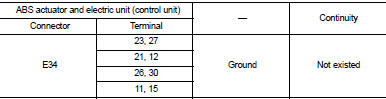
Is the inspection result normal? YES >> GO TO 15.
NO >> Repair or replace error-detected parts and GO TO 15.
15.CHECK DATA MONITOR (4)
With CONSULT-III.
1. Connect ABS actuator and electric unit (control unit) harness connector.
2. Connect wheel sensor harness connector.
3. Erase Self-diagnosis result for “ABS”.
4. Turn the ignition switch OFF, and wait 10 seconds or more.
5. Stat the engine.
6. Select “ABS” and “DATA MONITOR”, check “FR LH SENSOR”, “FR RH SENSOR”, “RR LH SENSOR” and “RR RH SENSOR”.
NOTE
:
Set the “DATA MONITOR” recording speed to “10 msec”.
7. Read a value (wheel speed) of both normal wheel sensors and error-detecting wheel sensor.
Regarding the deference at 30 km/h (19 MPH) between the wheel speed detected by the error detecting wheel sensor and the maximum/minimum wheel speed detected by the normal wheel sensors, is the difference within 5%, respectively? YES >> GO TO 16.
NO >> GO TO 17.
16.PERFORM SELF-DIAGNOSIS (5)
With CONSULT-III.
1. Drive the vehicle at approx. 30 km/h (19 MPH) or more for approx. 1 minute.
2. Stop the vehicle.
3. Perform self-diagnosis for “ABS”.
Is DTC “C1105”, “C1106”, “C1107” or “C1108” detected? YES >> GO TO 17.
NO >> INSPECTION END
17.REPLACE WHEEL SENSOR
With CONSULT-III.
1. Replace wheel sensor.
- Front: Refer to BRC-84, "FRONT WHEEL SENSOR : Removal and Installation".
- Rear: Refer to BRC-86, "REAR WHEEL SENSOR : Removal and Installation".
2. Erase Self-diagnosis result for “ABS”.
3. Turn the ignition switch OFF, and wait 10 seconds or more.
4. Stat the engine.
5. Select “ABS” and “DATA MONITOR”, check “FR LH SENSOR”, “FR RH SENSOR”, “RR LH SENSOR” and “RR RH SENSOR”.
NOTE
:
Set the “DATA MONITOR” recording speed to “10 msec”.
6. Read a value (wheel speed) of both normal wheel sensors and error-detecting wheel sensor.
Regarding the deference at 30 km/h (19 MPH) between the wheel speed detected by the error detecting wheel sensor and the maximum/minimum wheel speed detected by the normal wheel sensors, is the difference within 5%, respectively? YES >> GO TO 18.
NO >> GO TO 19.
18.PERFORM SELF-DIAGNOSIS (6)
With CONSULT-III.
1. Drive the vehicle at approx. 30 km/h (19 MPH) or more for approx. 1 minute.
2. Stop the vehicle.
3. Perform self-diagnosis for “ABS”.
Is DTC “C1105”, “C1106”, “C1107” or “C1108” detected? YES >> GO TO 19.
NO >> INSPECTION END
19.REPLACE SENSOR ROTOR
With CONSULT-III.
1. Replace sensor rotor.
- Front: Refer to BRC-84, "FRONT WHEEL SENSOR : Removal and Installation".
- Rear: Refer to BRC-86, "REAR WHEEL SENSOR : Removal and Installation".
2. Erase Self-diagnosis result for “ABS”.
3. Turn the ignition switch OFF, and wait 10 seconds or more.
4. Stat the engine.
5. Drive the vehicle at approx. 30 km/h (19 MPH) or more for approx. 1 minute.
6. Stop the vehicle.
7. Perform self-diagnosis for “ABS”.
Is DTC “C1105”, “C1106”, “C1107” or “C1108” detected? YES >> Replace ABS actuator and electric unit (control unit). Refer to BRC-90, "Removal and Installation".
NO >> INSPECTION END
 C1101, C1102, C1103, C1104 WHEEL SENSOR
DTC Logic
DTC DETECTION LOGIC
DTC CONFIRMATION PROCEDURE
1.PRECONDITIONING
If “DTC CONFIRMATION PROCEDURE” has been previously conducted, always turn
ignition switch OFF and
wait at least ...
 C1109 power and ground system
DTC Logic
DTC DETECTION LOGIC
DTC CONFIRMATION PROCEDURE
1.PRECONDITIONING
If “DTC CONFIRMATION PROCEDURE” has been previously conducted, always turn
ignition switch OFF and
wait at least ...
Other materials:
Positive crankcase ventilation
Inspection
1.CHECK PCV VALVE
With engine running at idle, remove PCV valve from rocker cover. A
properly working valve makes a hissing noise as air passes through
it. A strong vacuum should be felt immediately when a finger is
placed over valve inlet.
Is the inspection result normal?
YES &g ...
Squeak and rattle trouble diagnoses
Work Flow
CUSTOMER INTERVIEW
Interview the customer if possible, to determine the conditions that exist
when the noise occurs. Use the Diagnostic
Worksheet during the interview to document the facts and conditions when the
noise occurs and any of
customer's comments; refer to DLK-553, &quo ...
DPF (diesel particulate filter) data clear
Description
Perform ???DIESEL PARTICULATE FILTER DATA CLEAR??? in ???WORK SUPPORT??? mode with
CONSULT-III
when oxidation catalyst with diesel particulate filter is replaced as new one.
Based on the signal from sensors
ECM estimates the amount of particulate matter in diesel particulate filte ...
