
Nissan Juke Owners Manual : Locking with inside lock knob
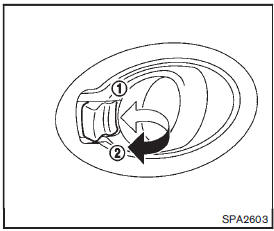
To lock the door without the key, move the inside lock knob to the lock position1 then close the door.
To unlock, move the inside lock knob to the unlock position2 .
When locking the door without a key, be sure not to leave the key inside the vehicle.
 Locking with key
The power door lock system allows you to lock or unlock all doors simultaneously.
• Turning the driver’s door key cylinder to the front of the vehicle1 will
lock all doors and the lift ...
 Locking with power door lock switch
Driver’s armrest
Operating the power door lock switch will lock or unlock all the doors. The switch
is located on the driver’s door armrest.
To lock the doors, push the power door lock switc ...
Other materials:
Front seat (2WD)
Exploded View
DRIVER SEAT
LHD models
1. Headrest
2. Headrest holder (locked)
3. Headrest holder (free)
4. Seatback heater unit
5. Inner lower cover
6. Seatback trim
7. Seatback pad
8. Seat cushion inner finisher
9. Reclining device inner cover
10. Anchor bolt
11. Seat belt buck ...
Fluid cooler system
Exploded View
1. Bracket
2. Bracket
3. Bracket
4. CVT fluid cooler
5. Clamp
6. CVT fluid cooler hose C
7. CVT fluid cooler hose B
8. CVT fluid cooler tube assembly
9. CVT fluid cooler hose D
10. CVT fluid cooler hose A
11. Transaxle assembly
A. CVT oil warmer
: Vehicle front
: ...
Brake master cyl
Exploded View
2WD
1. Reservoir cap
2. Oil strainer
3. Reservoir tank
4. Cylinder body
5. Pin
6. O-ring
7. Grommet
: Apply polyglycol ether based
lubricant.
: Apply brake fluid.
: N·m (kg-m, ft-lb)
: Always replace after every
disassembly.
4WD
1. Reservoir cap
2. Oil stra ...
