
Nissan Juke Owners Manual : Locking with key
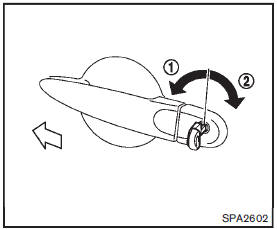
The power door lock system allows you to lock or unlock all doors simultaneously.
• Turning the driver’s door key cylinder to the front of the vehicle1 will lock all doors and the lift gate.
• Turning the driver’s door key cylinder once to the rear of the vehicle2 will unlock the driver’s door. After returning the key to the neutral position, turning it to the rear again within 5 seconds will unlock all doors and the lift gate.
 Doors
Doors
WARNING
• Always have the doors locked while driving. Along with the use of
seat belts, this provides greater safety in the event of an accident by helping
to prevent persons from being t ...
 Locking with inside lock knob
To lock the door without the key, move the inside lock knob to the lock position1
then close the door.
To unlock, move the inside lock knob to the unlock position2 .
When locking the door withou ...
Other materials:
Precaution
Precaution for Supplemental Restraint System (SRS) "AIR BAG" and "SEAT
BELT
PRE-TENSIONER"
The Supplemental Restraint System such as “AIR BAG� and “SEAT BELT PRE-TENSIONER�,
used along
with a front seat belt, helps to reduce the risk or severity of injury to the
...
G sensor
Exploded View
1. G sensor
: Vehicle front
: N·m (kg-m, in-lb)
Removal and Installation
CAUTION:
• Never drop or strike G sensor, because it has little tolerance for impact.
• Never use a power tool to avoid impact.
REMOVAL
1. Disconnect the battery cable from the negative terminal. R ...
Back door lock
Exploded View
1. Back door lock assembly 2. TORX bolt 3. Back door striker
: Do not reuse
: N·m (kg-m, ft-lb)
: Body grease
Door lock
DOOR LOCK : Removal and Installation
REMOVAL
1. Remove the back door lower finisher. Refer to INT-35, "BACK DOOR LOWER
FINISHER : Removal and
Insta ...
