
Nissan Juke Service and Repair Manual : Light & rain sensor
Component Function Check
1.CHECK LIGHT & RAIN SENSOR
1. Clean light & rain sensor detection area of windshield fully.
2. Turn ignition switch ON.
3. Turn lighting switch AUTO.
4. With the light & rain sensor illuminating, check the auto light function.

Is the inspection result normal? YES >> Light & rain sensor is normal.
NO >> Refer to EXL-67, "Diagnosis Procedure".
Diagnosis Procedure
1.CHECK LIGHT & RAIN SENSOR FUSE
1. Turn ignition switch OFF.
2. Check that the following fuse is not fusing.

Is the inspection result normal? YES >> GO TO 2.
NO >> Replace the fuse after repairing the applicable circuit.
2.CHECK LIGHT & RAIN SENSOR POWER SUPPLY
1. Disconnect light & rain sensor connector.
2. Check voltage between light & rain sensor harness connector and ground.

Is the inspection result normal? YES >> GO TO 3.
NO >> Repair or replace harness.
3.CHECK LIGHT & RAIN SENSOR GROUND CIRCUIT
Check continuity between light & rain sensor harness connector and ground.

Is the inspection result normal? YES >> GO TO 4.
NO >> Repair or replace harness.
4.CHECK LIGHT & RAIN SENSOR SIGNAL
1. Connect light & rain sensor connector.
2. Turn ignition switch ON.
3. Check signal between BCM harness connector and ground with oscilloscope.
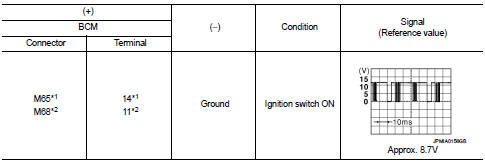
*1: Without Intelligent Key *2: With Intelligent Key
Is the inspection result normal? YES >> Replace light & rain sensor.
NO >> GO TO 5.
5.CHECK LIGHT & RAIN SENSOR SIGNAL CIRCUIT FOR OPEN
1. Turn ignition switch OFF.
2. Disconnect BCM connector and light & rain sensor connector.
3. Check continuity between BCM harness connector and light & rain sensor harness connector.

*1: Without Intelligent Key *2: With Intelligent Key
Is the inspection result normal? YES >> GO TO 6.
NO >> Repair or replace harness.
6.CHECK LIGHT & RAIN SENSOR SIGNAL CIRCUIT FOR SHORT
Check continuity between BCM harness connector and ground.

*1: Without Intelligent Key *2: With Intelligent Key
Is the inspection result normal? YES >> Refer to BCS-93, "Removal and Installation" (with Intelligent Key), BCS-161, "Removal and Installation" (without Intelligent Key).
NO >> Repair or replace harness.
 License plate lamp circuit
Without daytime running light system
WITHOUT DAYTIME RUNNING LIGHT SYSTEM : Component Function Check
1.CHECK TAIL LAMP (RH) OPERATION
Check that the tail lamp (RH) is turned ON.
Is the inspectio ...
 Turn signal lamp circuit
Component Function Check
1.CHECK TURN SIGNAL LAMP
CONSULT-III ACTIVE TEST
1. Select “FLASHER� of BCM (FLASHER) active test item.
2. With operating the test items, check that the turn signal la ...
Other materials:
ECU diagnosis information
IPDM E/R
Reference Value
VALUES ON THE DIAGNOSIS TOOL
TERMINAL LAYOUT
PHYSICAL VALUES
*1: MR16DDT engine models
*2: Except MR16DDT engine models
*3: CVT models
*4: M/T models
*5: With daytime running light system
*6: Without daytime running light system
*7: K9K engine models ...
Reporting safety defects
For USA
If you suspect that your Nissan Leaf possesses a safety-related defect that could potentially result in a collision, injury, or death, it is imperative that you notify the National Highway Traffic Safety Administration (NHTSA) immediately, in addition to reporting your concerns directly ...
Magnet clutch
Component Function Check
1.CHECK MAGNET CLUTCH OPERATION
Perform auto active test of IPDM E/R. Refer to PCS-12, "Diagnosis
Description" (with Intelligent Key) or PCS-
43, "Diagnosis Description" (without Intelligent Key).
Does it operate normally?
YES >> INSPECTION ...
