
Nissan Juke Service and Repair Manual : Intelligent key
Component Function Check
1.CHECK FUNCTION
1. Select “INTELLIGENT KEY� of “BCM� using CONSULT-III.
2. Select “RKE OPE COUN1� in “DATA MONITOR� mode.
3. Check that the function operates normally according to the following conditions.

Is the inspection result normal? YES >> Intelligent Key is OK.
NO >> Refer to DLK-91, "Diagnosis Procedure".
Diagnosis Procedure
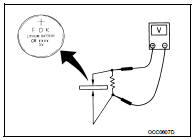
1.CHECK INTELLIGENT KEY BATTERY
Check by connecting a resistance (approximately 300 Ω) so that the current value becomes about 10 mA. Refer to DLK-193, "Removal and Installation".
Standard : Approx. 2.5 - 3.0 V
Is the measurement value within the specification? YES >> Replace Intelligent Key.
NO >> Replace Intelligent Key battery.
 Hazard function
Component Function Check
1.CHECK FUNCTION
1. Select “INTELLIGENT KEY� of “BCM� using CONSULT-III.
2. Select “FLASHER� in “ACTIVE TEST� mode.
3. Check that the function operates nor ...
 Intelligent key warning buzzer
Component Function Check
1.CHECK FUNCTION
1. Select “INTELLIGENT KEY� of “BCM� using CONSULT-III.
2. Select “OUTSIDE BUZZER� in “ACTIVE TEST� mode.
3. Check that the function opera ...
Other materials:
High pressure fuel pump and fuel hose
Exploded View
CAUTION:
Never remove or disassemble parts unless instructed as shown in the figure.
1. High pressure fuel pump insulator
2. High pressure fuel pump
3. O-ring
4. Valve lifter
5. Fuel tube assembly
6. Bracket
7. Fuel pump connector protector
8. Fuel feed hose
A. To ce ...
Precaution Necessary for Steering Wheel Rotation after Battery Disconnect
NOTE:
• Before removing and installing any control units, first turn the ignition
switch to the LOCK position, then disconnect
both battery cables.
• After finishing work, confirm that all control unit connectors are connected
properly, then re-connect both
battery cables.
• Always us ...
Water pump
Exploded View
1. Gasket
2. Water pump
: N·m (kg-m, ft-lb)
: Always replace after every
disassembly.
Removal and Installation
REMOVAL
1. Drain engine coolant from radiator. Refer to CO-11, "Draining".
CAUTION:
• Perform this step when the engine is cold.
• Never spill ...
