
Nissan Juke Service and Repair Manual : Ignition coil, spark plug and rocker cover
Exploded View
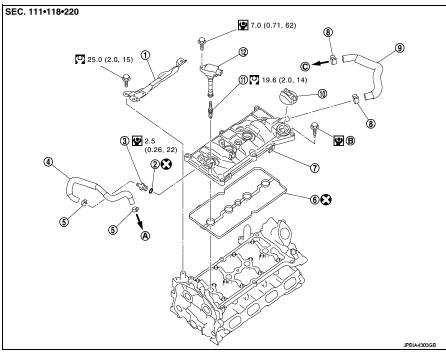
1. Rocker cover protector
2. O-ring
3. PCV control valve
4. PCV hose
5. Clamp
6. Rocker cover gasket
7. Rocker cover
8. Clamp
9. PCV hose
10. Oil filler cap
11. Spark plug
12. Ignition coil
A. To air duct assembly B.Tightening must be done following the installation procedure.
Refer to EM-53
C. To turbocharger inlet tube
 : N·m (kg-m, ft-lb)
 : N·m (kg-m, in-lb)
 : Always replace after every
disassembly.
Removal and Installation
REMOVAL
1. Drain engine coolant. Refer to CO-11, "Draining".
2. Remove engine cover. Refer to EM-25, "Exploded View".
3. Remove intake manifold. Refer to EM-28, "Exploded View".
4. Remove air inlet tube assembly. Refer to EM-31, "Exploded View".
5. Remove PCV hose.
6. Remove rocker cover protector.
7. Disconnect ignition coil harness connector, and them remove ignition coil.
CAUTION:
• Never drop or shock ignition coil.
• Never disassemble ignition coil.
8. Move ignition harness.
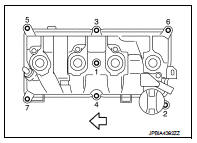
9. Remove rocker cover.
• Loosen bolts in reverse order shown in the figure.
 : Engine front
10. Remove PCV valve and PCV hose, if necessary.
11. Remove rocker cover gasket from rocker cover.
INSTALLATION
1. Install the rocker cover gasket to rocker cover.
CAUTION:
Check the gasket is not dropped.
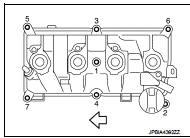
2. Install rocker cover.
• Tighten bolts in two steps separately in numerical order as shown in the figure.
: Engine front
1st step : 1.96 N·m (0.20 kg-m,
17 in-lb)
2nd step : 8.33 N·m (0.85 kg-m, 74
in-lb)
3. Install in the reverse order of removal, for the rest of parts.
 Fuel injector and fuel tube
Exploded View
1. Holder
2. Seal ring (white)
3. Backup ring
4. O-ring (blue)
5. Fuel injector
6. Stud bolt
7. Fuel tube assembly
8. Fuel tube insulator
9. Fuel tube protector
10. Fu ...
 Unit removal and installation
Engine assembly
2WD
2WD : Exploded View
1. Washer
2. Upper torque rod (RH)
3. Engine mounting insulator (RH)
4. Rear torque rod bracket
5. Rear torque rod
6. Engine mounting insulator (L ...
Other materials:
Clock (if so equipped)
The digital clock (in the audio unit) displays time when the ignition switch
is in the ACC or ON position. The clock ON or OFF mode can be selected. For details
of the digital clock in the NAVIGATION SYSTEM, refer to “Clock� .
If the power supply is disconnected, the clock will not indicate ...
B1170, B1171, B1172, B1173, B1174, B1175 diagnosis sensor uniT
DTC Logic
DTC DETECTION LOGIC
DTC CONFIRMATION PROCEDURE
1.CHECK SELF-DIAG RESULT
With CONSULT-III
1. Turn ignition switch ON.
2. Perform “Self Diagnostic Result� mode of “AIR BAG� using CONSULT-III.
Without CONSULT-III
1. Turn ignition switch ON.
2. Check the air bag warning la ...
Front coil spring and strut
Exploded View
2WD
1. Piston rod lock nut
2. Mounting insulator
3. Mounting bearing
4. Bound bumper
5. Coil spring
6. Lower rubber seat
7. Strut
8. Steering knuckle
: N·m (kg-m, ft-lb)
: Always replace after every
disassembly
4WD
1. Piston rod lock nut
2. Mounting insulator ...
