
Nissan Leaf 2018-2025 (ZE1) Owner's Manual : How to enable/disable the RCTA system
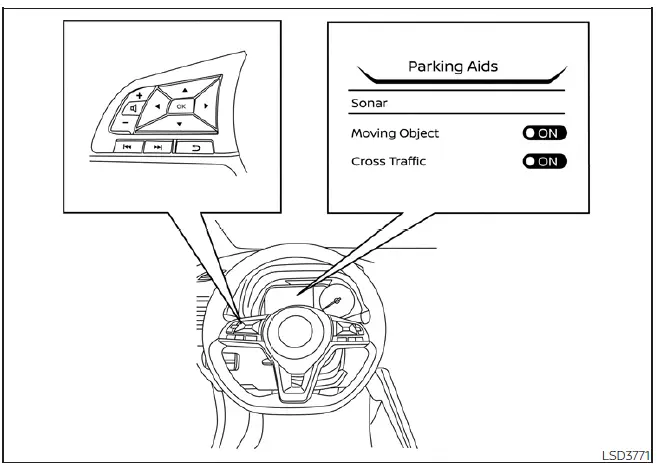
Follow these steps to customize or toggle the RCTA system settings:
1. Press the  button repeatedly until "Settings" appears on the vehicle information display.
Use the  button to navigate to "Driver Assistance," then press the OK button to enter the submenu.
2. Select "Parking Aids" and confirm by pressing the OK button.
3. Select "Cross Traffic" and use the OK button to toggle the system between On and Off.
NOTE:
Your selected configuration for the RCTA system is stored in the vehicle's memory and will be automatically retained even after the Nissan Leaf EV system is turned off and restarted.
RCTA system limitations
WARNING
The RCTA system is subject to specific technical limitations. Operating the Nissan Leaf without awareness of these constraints could result in dangerous situations, including accidents or injury.
- Always perform a manual visual check of your surroundings and look behind you before initiating a reversing maneuver. The radar sensors specifically target moving vehicles. The system cannot reliably detect non-vehicle objects or certain low-speed situations, including:
- Pedestrians, cyclists, motorcyclists, animals, or small toy vehicles operated by children.
- Vehicles passing at high relative speeds (greater than approximately 19 mph / 30 km/h).
- Vehicles traveling at very low speeds (lower than approximately 5 mph / 8 km/h).
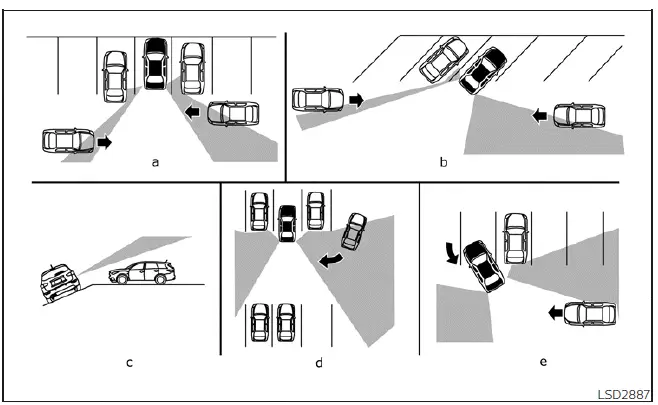
- The radar sensors may encounter difficulty detecting approaching vehicles under these specific conditions:
- Scenario a: A large vehicle parked immediately next to your Nissan Leaf is physically blocking the radar's field of view.
- Scenario b: Your vehicle is parked at an angle in a parking space, changing the effective detection geometry.
- Scenario c: The vehicle is positioned on an incline or sloped ground.
- Scenario d: An approaching vehicle is turning directly into the parking aisle you are currently occupying.
- Scenario e: The angle formed between your Nissan Leaf and the approaching vehicle is too small for the radar to accurately triangulate the motion.
- External environmental conditions can significantly impair the radar's detection capabilities:
- Severe weather, including heavy rain or snow.
- Significant road spray from nearby traffic.
- Accumulation of ice, frost, heavy snow, or thick mud on the rear bumper.
- Do not obstruct the sensors: Avoid attaching stickers (even transparent ones), installing aftermarket accessories, or applying additional paint over the rear bumper area near the radar sensors. These modifications can obstruct radar waves and degrade detection performance.
- Auditory warnings: Excessive cabin noise—such as high audio system volume or driving with windows open—may drown out the audible chime, potentially preventing you from hearing the RCTA warning.
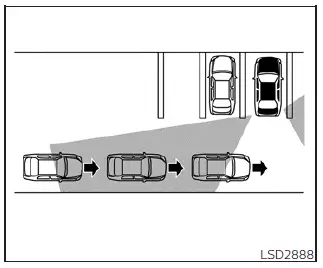
Illustration 1
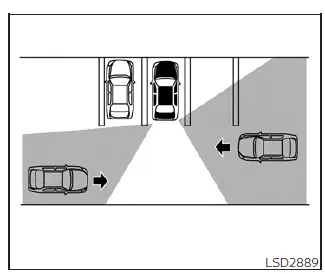
Illustration 2
NOTE:
When multiple vehicles are approaching in a single file (Illustration 1) or from opposite directions (Illustration 2), the RCTA system may sound only for the first vehicle detected and might not generate additional chimes for subsequent vehicles as they pass the sensor range.
 RCTA system operation
Side Indicator Light
The RCTA system acts as an extra set of eyes, helping to alert the driver to approaching traffic while reversing out of a parking stall ...
 System Temporarily Unavailable
When the advanced safety sensors detect radar blockage, the Nissan Leaf safety suite will automatically deactivate affected systems to ensure reliability. These features will remain unavailable until ...
Other materials:
NISSAN Intelligent Key Operation
This hands-free proximity system allows you to completely secure or access your vehicle cabin without ever needing to physically retrieve the Intelligent Key transmitter from your pocket, briefcase, or handbag.
As long as you are personally carrying the registere ...
Cold weather driving
CAUTION
To maintain the long-term integrity and health of your Nissan Leaf Li-ion battery, it is crucial that you do not store the vehicle in ambient temperatures below -13ºF (-25ºC) for a duration exceeding seven days. When the external temperature reaches -13ºF (-25ºC) or lower, the batte ...
Cockpit
1. Outside mirror remote control switch
2. Headlight, fog light and turn signal switch
— Headlight
— Turn signal light
— Fog light
3. Steering wheel
— Electric power steering system
— Horn
— Driver’s supplemental air bag
4. Wiper and washer switch
5. Shift lever
— Contin ...
