
Nissan Leaf 2018-2025 (ZE1) Owner's Manual : RCTA system operation
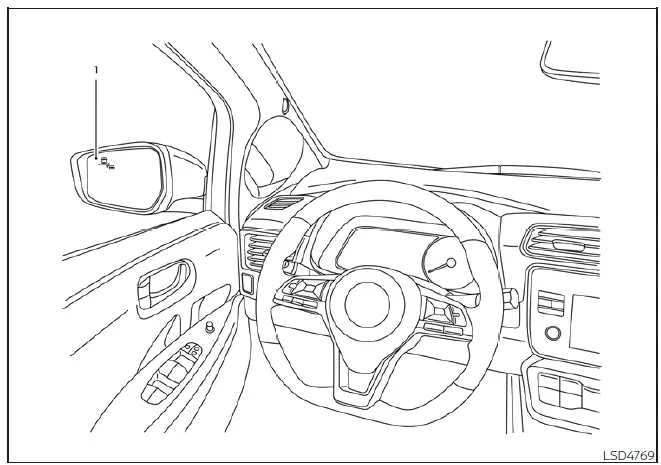
- Side Indicator Light
The RCTA system acts as an extra set of eyes, helping to alert the driver to approaching traffic while reversing out of a parking stall or driveway.
The system becomes active when the shift position is set to R (Reverse) and your vehicle speed remains below approximately 5 mph (8 km/h).
If the integrated radar sensors detect a vehicle approaching from either side, the system will trigger a single chime and the corresponding side indicator light (1) will flash, indicating which direction the approaching traffic is coming from relative to your Nissan Leaf.
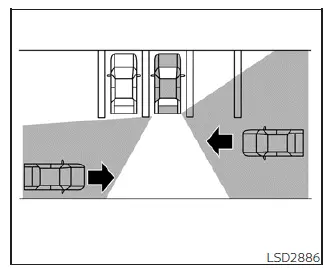
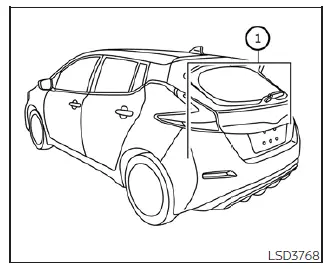
The RCTA functionality is powered by two radar sensors (1) mounted internally on both sides of the rear bumper area to provide comprehensive coverage.
These radar sensors are capable of detecting an approaching vehicle from a distance of up to approximately 66 ft (20 m).
 Rear Cross Traffic Alert (RCTA)
WARNING
Failure to strictly adhere to the safety warnings and operational instructions regarding the Rear Cross Traffic Alert (RCTA) system can lead to severe vehicle damage, serious personal inj ...
 How to enable/disable the RCTA system
Follow these steps to customize or toggle the RCTA system settings:
1. Press the button repeatedly until "Settings" appears on the vehicle information display.
...
Other materials:
Diagnosis and repair work flow
Work Flow
OVERALL SEQUENCE
DETAILED FLOW
1.GET INFORMATION FOR SYMPTOM
1. Get the detailed information from the customer about the symptom (the
condition and the environment
when the incident/malfunction occurred).
2. Check operation condition of the function that is malfunctioning.
> ...
Wheels
Wash the wheels when washing the vehicle to maintain their appearance.
• Clean the inner side of the wheels when the wheel is changed or the underside
of the vehicle is washed.
• Inspect wheel rims regularly for dents or corrosion. Such damage may cause loss
of pressure or poor seal at the ...
System
POWER DISTRIBUTION SYSTEM
POWER DISTRIBUTION SYSTEM : System Description
SYSTEM DESCRIPTION
• PDS (POWER DISTRIBUTION SYSTEM) is the system that BCM controls with the
operation of the pushbutton
ignition switch and performs the power distribution to each power circuit. This
system is used ...
