
Nissan Juke Service and Repair Manual : Headlamp aiming adjustment
LHD
LHD : Description
PREPARATION BEFORE ADJUSTING
NOTE
:
• For details, refer to the regulations in your own country.
• Perform aiming if the vehicle front body has been repaired and/or the headlamp assembly has been replaced.
Before performing aiming adjustment, check the following.
• Adjust the tire pressure to the specification.
• Fill with fuel, engine coolant and each oil.
• Maintain the unloaded vehicle condition. (Remove luggage from the passenger compartment and the luggage room.) NOTE
:
Do not remove the temporary tire, jack and on-vehicle tool.
• Wipe out dirt on the headlamp.
CAUTION:
Never use organic solvent (thinner, gasoline etc.)
• Ride alone on the driver seat.
AIMING ADJUSTMENT SCREW
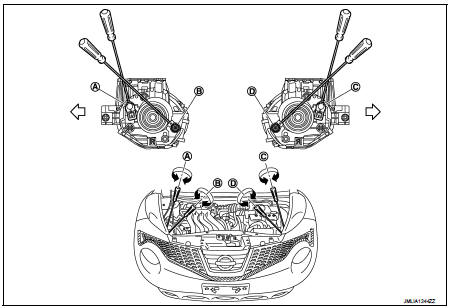
A. Headlamp RH (INSIDE/OUTSIDE)
adjustment screw
B. Headlamp RH (UP/DOWN)
adjustment screw
C. Headlamp LH (INSIDE/OUTSIDE)
adjustment screw
D. Headlamp LH (UP/DOWN)
adjustment screw
 : Vehicle center
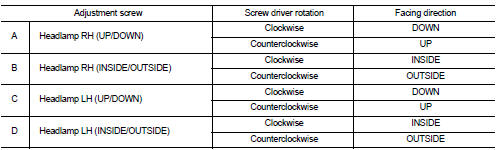
LHD : Aiming Adjustment Procedure
1. Place the screen.
NOTE
:
• Stop the vehicle at the perpendicular angle to the wall.
• Set the screen so that it is perpendicular to a level load surface.
2. Face the vehicle squarely toward the screen and make the distance between the headlamp center and the screen 10 m (32.8 ft).
3. Start the engine and illuminate the headlamp (LO).
NOTE
:
Block light from the headlamp that is not being adjusted with a thick fabric or
another object, so that it
does not reach the adjustment screen.
CAUTION:
Do not cover lens surface with tape, etc. because it is made from plastic.
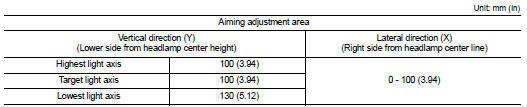
4. Use the aiming adjustment screw to adjust the elbow point projected by the low beams on the screen, so that it is within the aiming adjustment area.
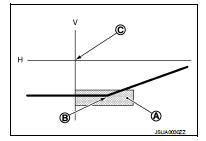
Low beam distribution on the screen
A. Aiming adjustment area
B. Elbow point
C. Headlamp center
H. Horizontal center line of headlamp
V. Vertical center line of headlamp
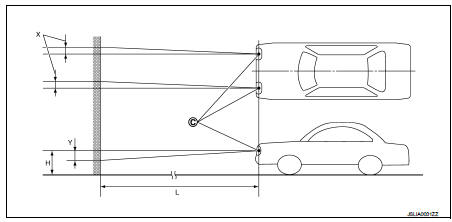
C. Vertical center line of headlamp
H. Horizontal center line of headlamp
L. Distance from headlamp center to screen
X. Aiming adjustment area
(lateral)
Y. Aiming adjustment area
(Vertical)
Distance from headlamp center to screen (L) : 10 m (32.8 ft)
RHD
RHD : Description
PREPARATION BEFORE ADJUSTING
NOTE
:
• For details, refer to the regulations in your own country.
• Perform aiming if the vehicle front body has been repaired and/or the headlamp assembly has been replaced.
Before performing aiming adjustment, check the following.
• Adjust the tire pressure to the specification.
• Fill with fuel, engine coolant and each oil.
• Maintain the unloaded vehicle condition. (Remove luggage from the passenger compartment and the luggage room.) NOTE
:
Do not remove the temporary tire, jack and on-vehicle tool.
• Wipe out dirt on the headlamp.
CAUTION:
Never use organic solvent (thinner, gasoline etc.)
• Ride alone on the driver seat.
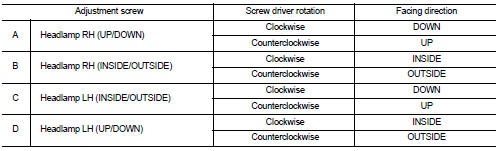
AIMING ADJUSTMENT SCREW
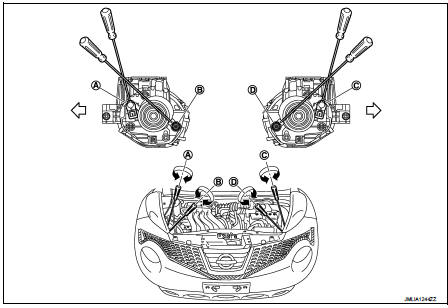
A. Headlamp RH (INSIDE/OUTSIDE)
adjustment screw
B. Headlamp RH (UP/DOWN)
adjustment screw
C. Headlamp LH (INSIDE/OUTSIDE)
adjustment screw
D. Headlamp LH (UP/DOWN)
adjustment screw
 : Vehicle center
RHD : Aiming Adjustment Procedure
1. Place the screen.
NOTE
:
• Stop the vehicle at the perpendicular angle to the wall.
• Set the screen so that it is perpendicular to a level load surface.
2. Face the vehicle squarely toward the screen and make the distance between the headlamp center and the screen 10 m (32.8 ft).
3. Start the engine and illuminate the headlamp (LO).
NOTE
:
Block light from the headlamp that is not being adjusted with a thick fabric or
another object, so that it
does not reach the adjustment screen.
CAUTION
:
Do not cover lens surface with tape, etc. because it is made from plastic.
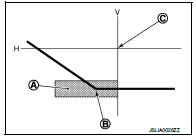
4. Use the aiming adjustment screw to adjust the elbow point projected by the low beams on the screen, so that it is within the aiming adjustment area.
Low beam distribution on the screen
A. Aiming adjustment area
B. Elbow point
C. Headlamp center
H. Horizontal center line of headlamp
V. Vertical center line of headlamp
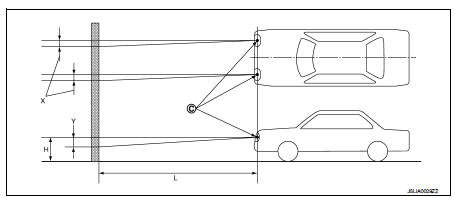
C. Vertical center line of headlamp
H. Horizontal center line of headlamp
L. Distance from headlamp center to screen
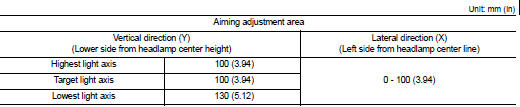
X. Aiming adjustment area
(lateral)
Y. Aiming adjustment area
(Vertical)
Distance from headlamp center to screen (L) : 10 m (32.8 ft)

 Front fog lamp aiming adjustment
Description
PREPARATION BEFORE ADJUSTING
NOTE:
For details, refer to the regulations in your own country.
Before performing aiming adjustment, check the following.
• Adjust the tire pressur ...
Other materials:
Fuel injector
Component Function Check
1.INSPECTION START
Turn ignition switch to START.
Is any cylinder ignited?
YES >> GO TO 2.
NO >> Proceed to EC-400, "Diagnosis Procedure".
2.CHECK FUEL INJECTOR FUNCTION
With CONSULT-III
1. Start engine.
2. Perform “POWER BALANCE� in ...
Precautions on cruise control
RES+ switch
CANCEL switch
SET- switch
Cruise control switch
If the cruise control system detects an internal fault or operational anomaly, it will deactivate automatically to maintain vehicle safety. The dedicated cruise ...
Brake piping
Front : Exploded View
WITHOUT ESP
1. Brake tube
2. ABS actuator and electric unit (control
unit)
3. Connector
4. Connector bracket
5. Master cylinder assembly
6. Brake booster
7. Lock plate
8. Brake hose
9. Union bolt
10. Copper washer
A. To rear brake tube
: N·m (kg-m, ft-lb)
...
