
Nissan Juke Service and Repair Manual : Front stabilizer
Exploded View
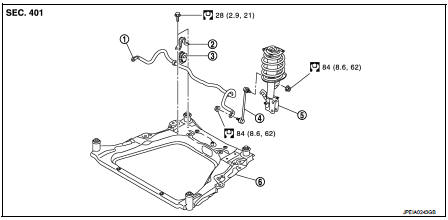
1. Stabilizer bar
2. Stabilizer clamp
3. Stabilizer bushing
4. Stabilizer connecting rod
5. Strut assembly
6. Front suspension member
 : N·m (kg-m, ft-lb)
Removal and Installation
REMOVAL
1. Remove tires. Refer to WT-7, "Removal and Installation".
2. Remove front suspension member. Refer to FSU-18, "Removal and Installation".
3. Remove stabilizer connecting rod.
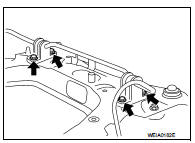
4. Remove mounting bolts ( ) of
) of
stabilizer clamp, and then
remove stabilizer clamp and stabilizer bushing from front suspension
member.
5. Remove stabilizer bar.
6. Perform inspection after removal. Refer to FSU-17, "Inspection".
INSTALLATION
Note the following, and install in the reverse order of removal.
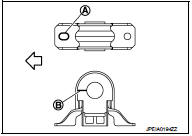
• Install stabilizer clamp and stabilizer bush with notch (A) and slit (B) faced forward of the vehicle ( ).
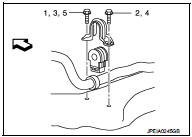
• To install stabilizer clamp mounting bolt, follow the tightening method and the numerical order shown below:
Manual tightening : 1 Temporary tightening : 2 → 3 Final tightening (Specified torque) : 4 → 5
 : Vehicle front
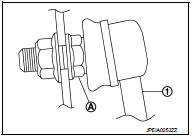
• To install stabilizer connecting rod (1), tighten the mounting nut with the hexagonal part (A) on the stabilizer connecting rod side fixed.
• Perform final tightening of bolts and nuts at the vehicle installation position (rubber bushing), under unladen conditions with tires on level ground.
• Perform inspection after installation. Refer to FSU-14, "Inspection".
Inspection
INSPECTION AFTER REMOVAL
Check stabilizer bar, stabilizer connecting rod, stabilizer bushing and stabilizer clamp for deformation, cracks or damage. Replace it if necessary.
INSPECTION AFTER INSTALLATION
Check wheel alignment. Refer to FSU-7, "Inspection".
 Transverse link
Exploded View
1. Front suspension member
2. Transverse link
: Always replace after every
disassembly.
: N·m (kg-m, ft-lb)
Removal and Installation
REMOVAL
1. Remove tires. Refer to WT-7, ...
 Front suspension member
Exploded View
2WD
1. Front suspension member
2. Damper assembly*
3. Rebound stopper rubber
4. Washer
5. Member stay
6. Rebound stopper
: N·m (kg-m, ft-lb)
*: For K9K models
4WD
1. ...
Other materials:
Unexpected brake pedal reaction
Description
A malfunction of brake pedal feel (height or others) is detected when brake
pedal is depressed.
Diagnosis Procedure
1.CHECK FRONT AND REAR AXLE
Check that there is no excessive looseness in front and rear axle.
• Front axle: Refer to FAX-41, "Inspection".
• Rear a ...
Bluetooth® Hands-Free Phone System
WARNING
• Use a phone after stopping your vehicle in a safe location. If you have
to use a phone while driving, exercise extreme caution at all times so full attention
may be given to vehicle operation.
• If you find yourself unable to devote full attention to vehicle operation while
tal ...
P2138 APP sensor
DTC Logic
DTC DETECTION LOGIC
NOTE:
If DTC P2138 is displayed with DTC P0643, first perform the trouble diagnosis
for DTC P0643. Refer to
EC-686, "DTC Logic".
DTC CONFIRMATION PROCEDURE
1.PRECONDITIONING
If DTC Confirmation Procedure has been previously conducted, always turn
...
