
Nissan Juke Service and Repair Manual : Front passenger air bag module
Exploded View
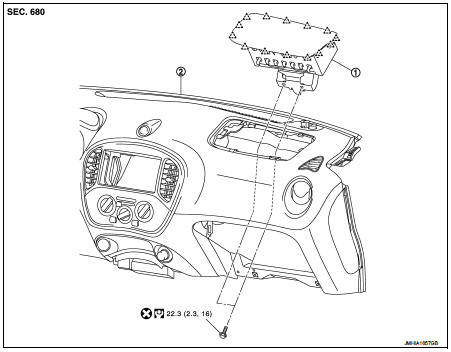
1. Front passenger air bag module 2. Instrument panel assembly
 : Pawl
 : Do not reuse
 : N·m (kg-m, ft-lb)
Removal and Installation
WARNING:
• Before servicing, turn ignition switch OFF, disconnect battery negative
terminal and wait 3 minutes
or more.
• Always work from the side of air bag module. Never work in front of it.
• Never use the air tools or the electric tools for servicing.
REMOVAL
1. Remove instrument side finisher RH, glove box lid, and glove box assembly. Refer to IP-13, "Removal and Installation".
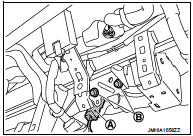
2. Disconnect front passenger air bag module harness connector (A) from front passenger air bag module.
3. Remove front passenger air bag module fixing bolts (B).
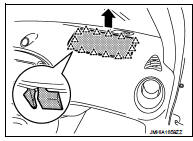
4. Put a hand to back of instrument panel (glove box opening), disengage connections of the passenger air bag module pawls from the inside of the vehicle toward the outside, and remove.
CAUTION:
• Never insert a remover tool between passenger air bag
module and instrument panel assembly. Doing so may
cause damage.
• Wear gloves.
 Pawl
Pawl
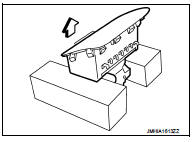
CAUTION:
• Always place the front passenger air bag module with pad
side facing upward.
 : Upward
• Never impact the front passenger air bag module.
• Replace the front passenger air bag module if it has been dropped or sustained an impact.
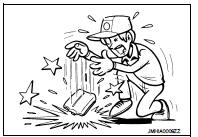
• Never insert any foreign objects (screwdriver, etc.) into the front passenger air bag module.
• Never disassemble the front passenger air bag module.
• Never expose the front passenger air bag module to temperatures exceeding 90 °C (194 °F).
• Never allow oil, grease, detergent, or water to come in contact with the front passenger air bag module.
INSTALLATION
Note the following items, and then install in the reverse order of removal.
CAUTION:
• Never use the old fixing bolts after removal, replace with the new bolts.
• Never damage the harness while installing.
• If malfunction is detected by the air bag warning lamp, after repair or replacement of the malfunctioning parts, reset the memory using self-diagnosis or CONSULT-III. Refer to SRC-12, "On Board Diagnosis Function" or SRC-16, "CONSULT-III Function".
• After the work is completed, check that no system malfunction is detected by air bag warning lamp.
 Spiral cable
Exploded View
1. Steering column upper cover
2. Steering column assembly
3. Steering column lower cover
4. Side lid LH
5. TORX bolt
6. Driver air bag module
7. TORX bolt
8. Side lid RH ...
 Side air bag module
Exploded View
1. Side air bag module
2. Front seat assembly
: Do not reuse
: N·m (kg-m, in-lb)
Removal and Installation
WARNING:
• Before servicing, turn ignition switch OFF, disconnect b ...
Other materials:
Intelligent Key
Replace the battery in the Intelligent Key as follows: 1. Remove the mechanical
key from the Intelligent Key.
2. Insert a small screwdriver into the slit of the corner and twist it to separate
the upper part from the lower part. Use a cloth to protect the casing.
3. Replace the battery with ...
Window washer fluid
To fill the window washer fluid reservoir, lift the cap and pour the window washer
fluid into the reservoir opening.
Add a washer solvent to the washer for better cleaning. In the winter season,
add a windshield washer antifreeze. Follow the manufacturer’s instructions for the
mixture rat ...
U0140 lost communication (BCM)
Description
CAN (Controller Area Network) is a serial communication line for real-time
application. It is an on-vehicle multiplex
communication line with high data communication speed and excellent malfunction
detection ability.
Many electronic control units are equipped onto a vehicle, and ...
