
Nissan Juke Owners Manual : Difference between predictive and actual distances
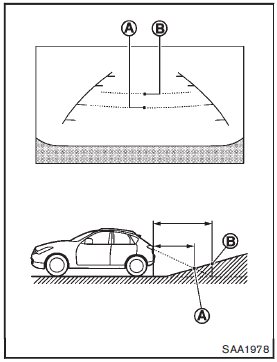
Backing up on a steep uphill
When backing up the vehicle up a hill, the distance guide lines and the vehicle width guide lines are shown closer than the actual distance.
For example, the display shows 3 ft (1 m) to the placeA , but the actual 3 ft (1 m) distance on the hill is the placeB . Note that any object on the hill is viewed in the monitor further than it appears.
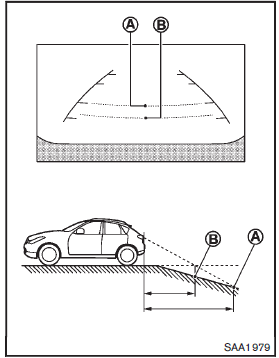
Backing up on a steep downhill
When backing up the vehicle down a hill, the distance guide lines and the vehicle width guide lines are shown further than the actual distance.
For example, the display shows 3 ft (1 m) to the placeA , but the actual 3 ft (1 m) distance on the hill is the placeB . Note that any object on the hill is viewed in the monitor closer than it appears.
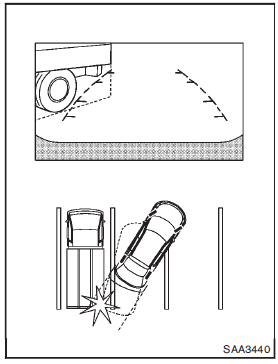
Backing up near a projecting object
The vehicle may seem to nearly clear the object in the display. However, the vehicle may hit the object if it projects over the actual backing up course.
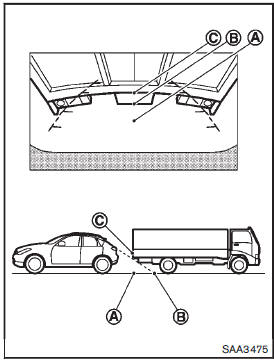
Backing up behind a projecting object The position C is shown further than the position B in the display. However, the position C is actually at the same distance as the position A . The vehicle may hit the object when backing up to the position A if the object projects over the actual backing up course.
 How to read the displayed lines
Guiding lines which indicate the vehicle width and distances to objects with
reference to the bumper lineA are displayed on the monitor.
Distance guide lines:
Indicate distances from the bumper. ...
 Operating tips
• When the shift lever is shifted to the R (Reverse) position, the monitor screen
automatically changes to the RearView Monitor mode. However, the radio can be heard.
• When the view is switche ...
Other materials:
B26FA cranking request circuit
DTC Logic
DTC DETECTION LOGIC
NOTE:
• If DTC B26FA is displayed with DTC U1000, first perform the trouble diagnosis
for DTC U1000. Refer to
BCS-83, "DTC Logic".
• If DTC B26FA is displayed with DTC U1010, first perform the trouble diagnosis
for DTC U1010. Refer to
BCS-84, &qu ...
Push-button ignition switch
Removal and Installation
REMOVAL
1. Remove the NATS antenna amp. Refer to SEC-167, "Removal and
Installation".
2. Remove the push-button ignition switch.
1. Disengage the push-button ignition switch fixing pawls
using minus driver etc.
2. Press the push-button ignition switch to ...
B1209 frontal collision detection
Description
The air bags and seat belt pre-tensioners for driver and passenger are
activated by the air bag diagnosis sensor
unit signal transmitted at the time of the frontal collision.
DTC Logic
DTC DETECTION LOGIC
DTC CONFIRMATION PROCEDURE
1.CHECK SELF-DIAG RESULT
With CONSULT-III
1. ...
