
Nissan Juke Owners Manual : How to read the displayed lines
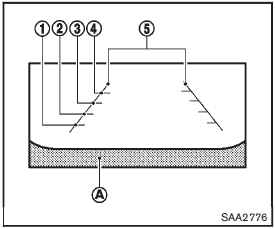
Guiding lines which indicate the vehicle width and distances to objects with reference to the bumper lineA are displayed on the monitor.
Distance guide lines:
Indicate distances from the bumper.
• Red line1 : approx. 1.5 ft (0.5 m) • Yellow line2 : approx. 3 ft (1 m) • Green line3 : approx. 7 ft (2 m) • Green line4 : approx. 10 ft (3 m)
Vehicle width guide lines5 :
Indicate the vehicle width when backing up.
 RearView monitor (if so equipped)
When the shift lever is shifted into the R (Reverse) position, the monitor display
shows the view to the rear of the vehicle.
The system is designed as an aid to the driver in situations such as sl ...
 Difference between predictive and actual distances
Backing up on a steep uphill
When backing up the vehicle up a hill, the distance guide lines and the vehicle
width guide lines are shown closer than the actual distance.
For example, the display ...
Other materials:
Front wiper does not operate
Description
The front wiper does not operate under any operation conditions.
Diagnosis Procedure
1.CHECK WIPER RELAY OPERATION
CONSULT-III ACTIVE TEST
1. Select “FRONT WIPER� of IPDM E/R active test item.
2. With operating the test item, check front wiper operation.
Lo : Front wiper LO op ...
RCTA system operation
Side Indicator Light
The RCTA system acts as an extra set of eyes, helping to alert the driver to approaching traffic while reversing out of a parking stall or driveway.
The system becomes active when the shift position is set to R (Reverse) ...
P062f eeprom
DTC Logic
DTC DETECTION LOGIC
DTC CONFIRMATION PROCEDURE
1.PREPARATION BEFORE WORK
If another "DTC CONFIRMATION PROCEDURE" occurs just before, turn ignition
switch OFF and wait for at
least 10 seconds, then perform the next test.
>> GO TO 2.
2.CHECK DTC DETECTION
1. S ...
