
Nissan Juke Service and Repair Manual : Diagnosis system (BCM)
Common item : consult-III Function (BCM - COMMON ITEM)
APPLICATION ITEM
CONSULT-III performs the following functions via CAN communication with BCM.
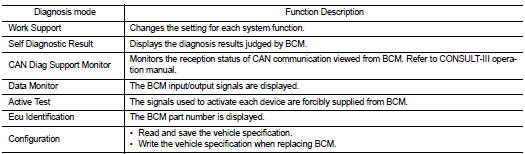
SYSTEM APPLICATION
BCM can perform the following functions for each system.
NOTE
:
It can perform the diagnosis modes except the following for all sub system
selection items.
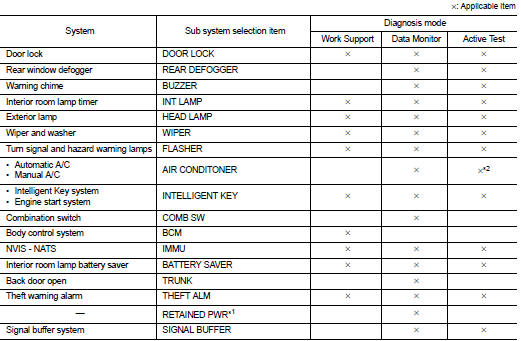
NOTE
:
• *1: This item is displayed, but not used.
• *2: For models with automatic A/C, this diagnosis mode is not used.
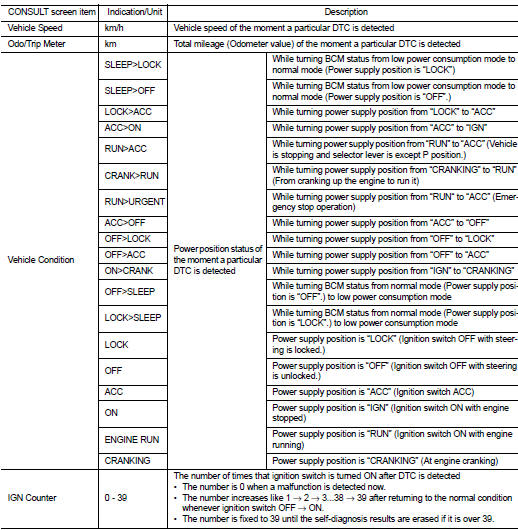
FREEZE FRAME DATA (FFD)
The BCM records the following vehicle condition at the time a particular DTC is detected, and displays on CONSULT-III.
Door lock : consult-III Function (BCM - DOOR LOCK) (With Super Lock)
BCM CONSULT-III FUNCTION
CONSULT-III performs the following functions via CAN communication with BCM.
WORK SUPPORT
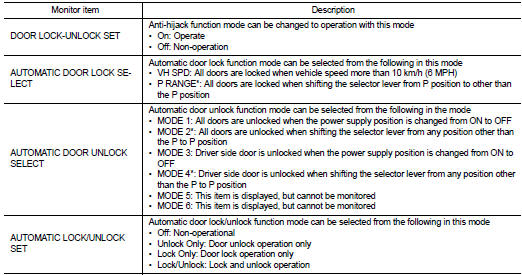
*: P range interlock door lock can be selected for M/T models, but automatic door lock/unlock function does not operate.
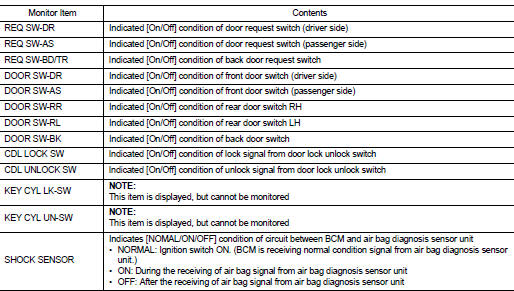
DATA MONITOR
ACTIVE TEST
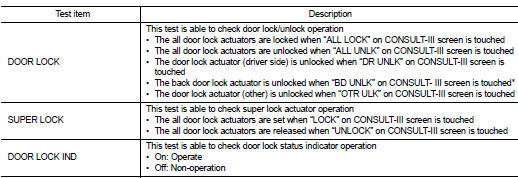
*: BD UNLK function does not operate.
Intelligent key : consult-III Function (BCM - INTELLIGENT KEY) (With Super Lock)
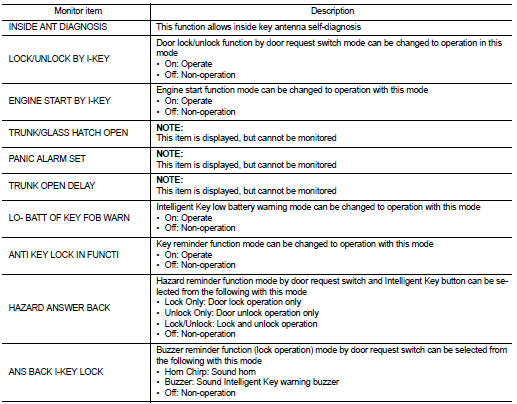
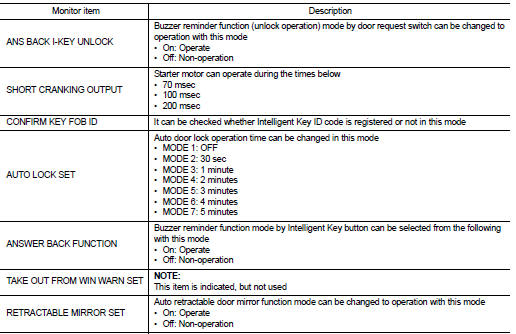
WORK SUPPORT
SELF-DIAG RESULT
Refer to BCS-67, "DTC Index".
DATA MONITOR
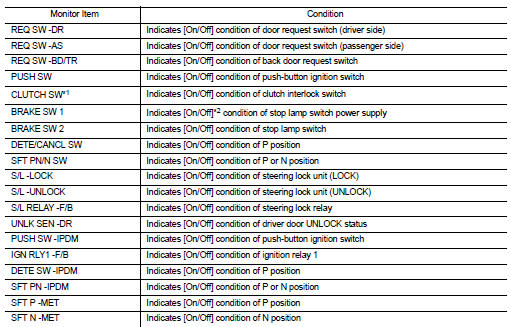
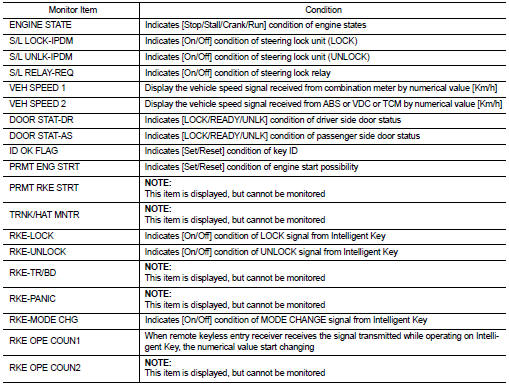
*1: It is displayed but does not operate on CVT models.
*2: OFF is displayed when brake pedal is depressed while brake switch power supply is OFF.
ACTIVE TEST
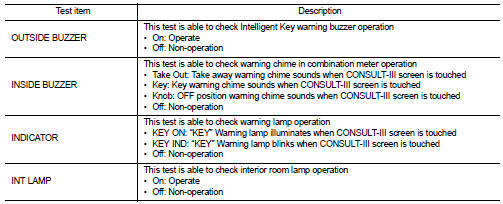
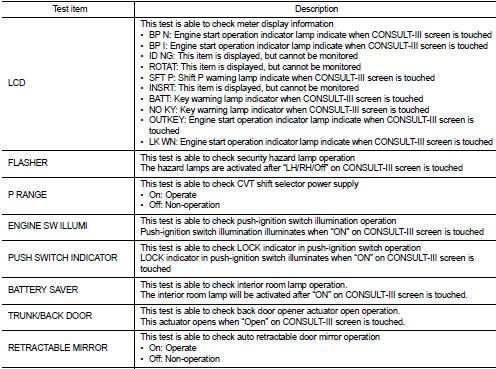
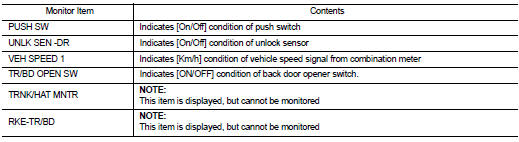
Trunk : consult-III Function (BCM - TRUNK) (With Super Lock)
DATA MONITOR
 Back door opener system
System Diagram
System Description
BACK DOOR OPENER OPERATION
When back door opener switch is pressed, BCM operates back door opener
actuator.
NOTE:
Back door opener actuator is not for lock ...
 ECU diagnosis information
BCM
List of ECU Reference
...
Other materials:
How to select piston and bearing
Description
• The identification grade stamped on each part is the grade for the
dimension measured in new condition. This grade cannot apply to reused parts.
• For reused or repaired parts, measure the dimension accurately. Determine the
grade by comparing the
measurement with the valu ...
Evaporative emission system
Evaporative emission system: System
Diagram
Evaporative emission system : System
Description
INPUT/OUTPUT SIGNAL CHART
*: ECM determines the start signal status by the signals of engine speed and
battery voltage.
SYSTEM DESCRIPTION
The evaporative emission system is used to reduce hy ...
Intelligent key warning buzzer
Component Function Check
1.CHECK FUNCTION
1. Select “INTELLIGENT KEY� of “BCM� using CONSULT-III.
2. Select “OUTSIDE BUZZER� in “ACTIVE TEST� mode.
3. Check that the function operates normally according to the following
conditions.
Is the inspection result normal?
YES >& ...
