
Nissan Juke Service and Repair Manual : CVT position
Inspection and Adjustment
INSPECTION
1. Place selector lever in “P� position, and turn ignition switch ON (engine stop).
2. Make sure that selector lever can be shifted to other than “P� position when brake pedal is depressed. Also make sure that selector lever can be shifted from “P� position only when brake pedal is depressed.
3. Move the selector lever and check for excessive effort, sticking, noise or rattle.
4. Confirm the selector lever stops at each position with the feel of engagement when it is moved through all the positions. Check that the actual position of the selector lever matches the position shown by the shift position indicator and the manual lever on the transaxle.
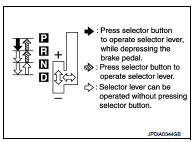
5. The method of operating the selector lever to individual positions correctly should be as shown.
6. When selector button is pressed in “P�, “R� or “N� position without applying forward/backward force to selector lever, check button operation for sticking.
7. Confirm the back-up lamps illuminate only when selector lever is placed in the “R� position. Confirm the back-up lamps do not illuminate when the selector lever is pushed toward the “R� position when in the “P� or “N� position.
8. Confirm the engine can only be started with the selector lever in the “P� and “N� positions.
9. Make sure transaxle is locked completely in “P� position.
10. When selector lever is set to manual shift gate, make sure that manual mode is displayed on combination meter.
Shift selector lever to “+� and “–� sides, and check that set shift position changes.
ADJUSTMENT
1. Place selector lever in “P� position.
CAUTION:
Turn wheels more than 1/4 rotations and apply the park lock.
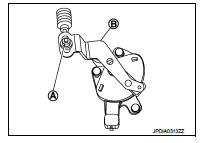
2. Loosen nut (A) and place manual lever (B) in “P� position.
CAUTION:
Never apply any force to the manual lever.
3. Tighten nut. Refer to TM-273, "Removal and Installation".
CAUTION:
Fix the manual lever when tightening.
 Road test
Description
DESCRIPTION
• The purpose of the test is to determine overall performance of CVT
and analyze causes of problems.
• The road test consists of the following three parts:
1. “Check ...

Other materials:
Control linkage
Exploded View
1. Bracket
2. Shifter cable
3. Selector lever
4. Shifter lever A
5. Tapping bolt
6. Cable mounting bracket
7. Selector cable
8. Grommet
9. M/T shift selector assembly
10. Shifter lever
11. Shifter lever knob
: Always replace after every
disassembly.
: N·m (kg-m ...
e-Pedal system
WARNING
Never rely solely on the innovative e-Pedal system to manage your speed or bring the vehicle to a halt, as there is a clear physical performance limit to the system's automated deceleration functions. Always drive carefully, maintain full situational awareness, and remain highly attenti ...
Speed limiter
Speed limiter : System Diagram
Speed limiter : System Description
INPUT/OUTPUT SIGNAL CHART
*: This signal is sent to the ECM through CAN communication line
BASIC SPEED LIMITER SYSTEM
• Speed limiter is a system that enables to restrict the vehicle speed within
the set speed that is se ...
