
Nissan Juke Service and Repair Manual : Camera image signal circuit
Description
• The NAVI control unit supplies power to the rear view camera when receiving a reverse signal.
• The rear view camera transmits camera images to the NAVI control unit when power is supplied from the NAVI control unit.
Diagnosis Procedure
1.CHECK CONTINUITY CAMERA POWER SUPPLY CIRCUIT
1. Turn ignition switch OFF.
2. Disconnect NAVI control unit connector and rear view camera connector.
3. Check continuity between NAVI control unit harness connector and rear view camera harness connector.

4. Check continuity between NAVI control unit harness connector and ground.

Is inspection result normal? YES >> GO TO 2.
NO >> Repair harness or connector.
2.CHECK VOLTAGE CAMERA POWER SUPPLY
1. Connect NAVI control unit connector and rear view camera connector.
2. Turn ignition switch ON.
3. Shift the selector lever to “R� position.
4. Check voltage between NAVI control unit harness connector and ground.

Is inspection result normal? YES >> GO TO 3.
NO >> Replace NAVI control unit. Refer to AV-84, "Removal and Installation".
3.CHECK CONTINUITY CAMERA IMAGE SIGNAL CIRCUIT
1. Turn ignition switch OFF.
2. Disconnect NAVI control unit connector and rear view camera connector.
3. Check continuity between NAVI control unit harness connector and rear view camera harness connector.

4. Check continuity between NAVI control unit harness connector and ground.

Is inspection result normal? YES >> GO TO 4.
NO >> Repair harness or connector.
4.CHECK CAMERA IMAGE SIGNAL
1. Connect NAVI control unit connector and rear view camera connector.
2. Turn ignition switch ON.
3. Shift the selector lever to “R� position.
4. Check signal between NAVI control unit harness connector and ground.
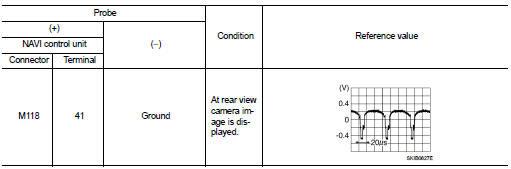
Is inspection result normal? YES >> Replace NAVI control unit. Refer to AV-84, "Removal and Installation".
NO >> Replace rear view camera. Refer to AV-92, "Removal and Installation".
 Microphone signal circuit
Description
Power is supplied from NAVI control unit to microphone. The microphone
transmits the sound voice to the
NAVI control unit.
Diagnosis Procedure
1.CHECK CONTINUITY BETWEEN NAVI CONTROL ...
 Steering switch signal A circuit
Description
Transmits the steering switch signal to NAVI control unit.
Diagnosis Procedure
1.CHECK STEERING SWITCH SIGNAL A CIRCUIT
1. Disconnect NAVI control unit connector and spiral cable conne ...
Other materials:
B1132 side air bag module RH
DTC Logic
DTC DETECTION LOGIC
DTC CONFIRMATION PROCEDURE
1.CHECK SELF-DIAG RESULT
With CONSULT-III
1. Turn ignition switch ON.
2. Perform “Self Diagnostic Result� mode of “AIR BAG� using CONSULT-III.
Without CONSULT-III
1. Turn ignition switch ON.
2. Check the air bag warning la ...
Vehicle security system cannot be set
Key fob
KEY FOB : Description
Armed phase is not activated when door is locked using keyfob.
NOTE:
Check that vehicle is under the condition shown in “CONDITIONS OF VEHICLE
(OPERATING CONDITIONS)�
before starting diagnosis, and check each symptom.
CONDITION OF VEHICLE (OPERATING COND ...
B26F0 steering lock relay
DTC Logic
DTC DETECTION LOGIC
NOTE:
• If DTC B26F0 is displayed with DTC U1000, first perform the trouble diagnosis
for DTC U1000. Refer to
BCS-83, "DTC Logic".
• If DTC B26F0 is displayed with DTC U1010, first perform the trouble diagnosis
for DTC U1010. Refer to
BCS-84, &qu ...
