
Nissan Juke Owners Manual : Hood
WARNING
• Make sure the hood is completely closed and latched before driving.
Failure to do so could cause the hood to fly open and result in an accident.
• If you see steam or smoke coming from the engine compartment, to avoid injury do not open the hood.
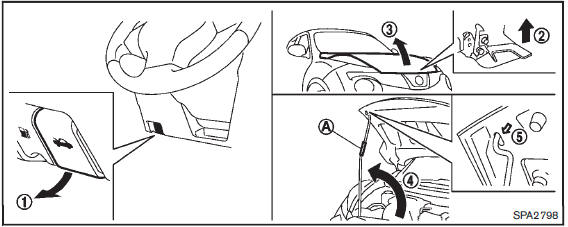
When opening the hood:
1. Pull the hood release handle 1 located below the instrument panel; the hood will then spring up slightly.
2. Locate the lever 2 in between the hood and grille, and pull the lever up with your fingertips.
3. Raise the hood3 .
4. Remove the support rod 4 and insert it into the slot5 .
Hold the coated partA when removing or resetting the support rod. Avoid direct contact with the metal parts, as they may be hot immediately after the engine has been stopped.
When closing the hood:
1. While supporting the hood, return the support rod to its original position.
2. Slowly lower the hood to about 8 to 12 in (20 to 30 cm) above the hood lock, then let it drop.
3. Make sure it is securely latched.
 How to use remote keyless entry function
WARNING
• Radio waves could adversely affect electric medical equipment. Those who
use a pacemaker should contact the electric medical equipment manufacturer for the
possible influences before ...
 Lift gate
WARNING
• Always be sure the lift gate has been closed securely to prevent it from
opening while driving.
• Do not drive with the lift gate open.
This could allow dangerous exhaust gases to b ...
Other materials:
Diagnosis system (BCM) (without intelligent key system)
common item
Common item : consult-III Function (BCM - common item)
APPLICATION ITEM
CONSULT-III performs the following functions via CAN communication with BCM.
SYSTEM APPLICATION
BCM can perform the following functions for each system.
NOTE:
It can perform the diagnosis modes except the following for ...
SRS air bag warning lamp does not turn off
Diagnosis Procedure
1.CHECK AIR BAG MODULE AND SEAT BELT PRE-TENSIONER
Check the deployment of air bag module.
Is air bag module deployed?
YES >> Replace the malfunctioning parts.
NO >> GO TO 2.
2.CHECK AIR BAG FUSE
Check 10 A fuse [No.2, located in fuse block (J/B)].
Is ...
P182F coupling temperature sensor left
DTC Logic
DTC DETECTION LOGIC
DTC CONFIRMATION PROCEDURE
1.PRECONDITIONING
If “DTC CONFIRMATION PROCEDURE� has been previously conducted, always turn
ignition switch OFF and
wait at least 10 seconds before conducting the next test.
>> GO TO 2.
2.DTC REPRODUCTION PROCEDURE
W ...
