
Nissan Juke Service and Repair Manual : Cooling fan
Component Function Check
1.CHECK COOLING FAN FUNCTION
 With CONSULT-III
1. Turn ignition switch ON.
2. Perform “COOLING FAN� in “ACTIVE TEST� mode with CONSULT-III.
3. Touch “LOW� and “Hi� on the CONSULT-III screen.
4. Check that cooling fan operates at each speed.
 Without CONSULT-III
1. Perform IPDM E/R auto active test and check cooling fan motor operation. Refer to PCS-12, "Diagnosis Description" (WITH I-KEY) or PCS-43, "Diagnosis Description" (WITHOUT I-KEY).
2. Check that cooling fan operates at each speed.
Is the inspection result normal? YES >> INSPECTION END
NO >> Refer to EC-774, "Diagnosis Procedure".
Diagnosis Procedure
1.CHECK GROUND CONNECTION
1. Turn ignition switch OFF.
2. Check ground connection E21 and E38. Refer to Ground Inspection in GI-44, "Circuit Inspection".
Is the inspection result normal? YES >> GO TO 2.
NO >> Repair or replace ground connection.
2.CHECK COOLING FAN MOTOR CIRCUIT
1. Disconnect cooling fan motor harness connector.
2. Check the continuity between IPDM E/R harness connector and cooling fan motor harness connector.
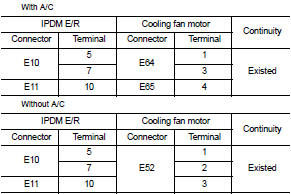
3. Check the continuity between cooling fan motor harness connector and ground.
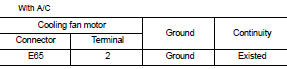
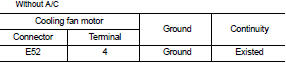
4. Also check harness for short to ground and short to power.
YES or NO YES >> GO TO 4.
NO >> GO TO 3.
3.DETECT MALFUNCTIONING PART
Check the following.
• Harness for open or short between cooling fan motor and IPDM E/R • Harness for open or short between cooling fan motor and ground
>> Repair open circuit or short to ground or short to power in harness or connectors.
4.CHECK COOLING FAN MOTOR
Refer to EC-775, "Component Inspection".
YES or NO YES >> GO TO 5.
NO >> Replace cooling fan motor.
5.CHECK INTERMITTENT INCIDENT
Perform GI-42, "Intermittent Incident".
YES or NO YES >> Replace IPDM E/R. Refer to PCS-34, "Exploded View" (WITH I-KEY) or PCS-63, "Exploded View" (WITHOUT I-KEY).
NO >> Repair or replace harness or connector.
Component Inspection
1.CHECK COOLING FAN MOTOR
1. Turn ignition switch OFF.
2. Disconnect cooling fan motor harness connector E62.
3. Supply cooling fan motor terminals with battery voltage and check operation.
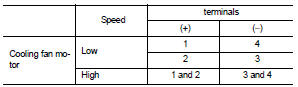
Is the inspection result normal? YES >> INSPECTION END
NO >> Replace cooling fan motor.
 Clutch pedal position switch
Component Function Check
1.CHECK CLUTCH PEDAL POSITION SWITCH FUNCTION
With CONSULT-III
1. Turn ignition switch ON.
2. Select “ENGINE� using CONSULT-III.
3. Select “CLUTCH P/P SW� in “D ...
 Electrical load signal
Description
The electrical load signal (Headlamp switch signal, rear window defogger
switch signal, etc.) is transferred to
ECM through the CAN communication line.
Component Function Check
1.CHE ...
Other materials:
Hood
Exploded View
1. Hood assembly
2. Hood bumper rubber
3. Radiator core seal
4. Hood bumper rubber
5. Clamp
6. Hood hinge
7. Grommet
8. Hood support rod
: Clip
: Pawl
: Body grease
Hood assembly
HOOD ASSEMBLY : Removal and Installation
CAUTION:
• Operate with two workers, becau ...
Fuel filler lid opener
Exploded View
1. Fuel filler lid opener cable
2. Cable protector
3. Fuel filler lid lock assembly
4. Fuel filler lid assembly
5. Spring
6. Bumper rubber
: Clip
: Do not reuse
Fuel filler lid
FUEL FILLER LID : Removal and Installation
REMOVAL
1. Fully open fuel filler lid.
2. Remove ...
Precaution Necessary for Steering Wheel Rotation after Battery Disconnect
NOTE:
• Before removing and installing any control units, first turn the ignition
switch to the LOCK position, then disconnect
both battery cables.
• After finishing work, confirm that all control unit connectors are connected
properly, then re-connect both
battery cables.
• Always us ...
