
Nissan Leaf 2018-2025 (ZE1) Owner's Manual : Conventional (fixed speed) cruise control mode
The conventional (fixed speed) cruise control mode in your Nissan Leaf offers a traditional driving experience, allowing you to maintain a constant speed between 25 and 90 mph (40 to 144 km/h) without the need to keep your foot engaged on the accelerator pedal.
WARNING
- Unlike the intelligent distance-control mode, the conventional (fixed speed) cruise control system does not feature radar detection. Consequently, it will not emit a warning chime if you approach a vehicle ahead too closely, as the system does not monitor lead vehicle presence or relative distance.
- You must maintain constant vigilance regarding the spacing between your Nissan Leaf and the vehicles in front of you; failure to do so could result in a serious collision.
- Always verify your active system settings by checking the status information on the Nissan Leaf vehicle information display.
- Do not utilize the conventional (fixed speed) cruise control mode in any of the following driving scenarios:
- Whenever external conditions prevent the vehicle from safely maintaining a consistent set speed.
- During periods of heavy, unpredictable, or stop-and-go traffic.
- While navigating winding, sharply curved, or steeply hilly road sections.
- On surfaces where traction is compromised, including those affected by rain, snow, ice, or loose gravel.
- In areas subject to strong, gusty wind conditions that could affect vehicle stability.
- Misuse of this system in the aforementioned conditions can lead to a loss of vehicle control and may result in an accident.
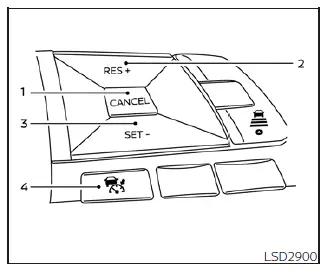
Conventional (fixed speed) cruise control switches
- CANCEL switch: Instantly deactivates the cruising function while retaining your previously set speed in the system's memory for quick resumption.
- RES+ switch: Resumes your last memorized speed or allows you to increase the cruising velocity incrementally.
- SET- switch: Captures and sets your current speed as the cruise target or enables you to decrease the set speed incrementally.
- ICC switch: Serves as the master control switch to power the system on and off.
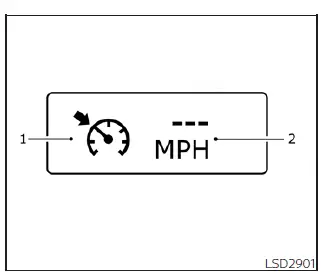
Conventional (fixed speed) cruise control mode display and indicators
Your active cruise status is clearly presented within the dedicated vehicle information display section.
- Cruise indicator: A color-coded status light that communicates the operational state of the Nissan Leaf cruise control system:
- Cruise control ON indicator (gray): Signals that the main ICC master switch has been activated and the system is in standby.
- Cruise control SET indicator (green): Confirms that a specific cruising speed has been successfully locked in and is being maintained.
- Cruise control warning (yellow): Illuminates to indicate a detected malfunction within the system architecture.
- Set vehicle speed indicator: Provides a digital readout of your currently locked cruising velocity. For Canadian Nissan Leaf models, this information is accurately displayed in km/h.
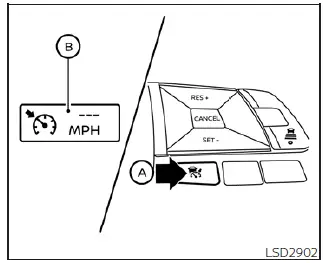
Operating conventional (fixed speed) cruise control mode
To engage the conventional (fixed speed) cruise control mode, press and hold the ICC switch A for approximately 1.5 seconds or longer.
When the ICC switch is activated, you will see the conventional mode display and indicators B appear on the Nissan Leaf instrument cluster. Once the 1.5-second threshold is crossed, the distance-control graphics will fade, and the dedicated cruise indicator will remain, signifying that you are ready to set your desired cruising speed. Pressing the ICC switch again will completely power down the system. Furthermore, the system will automatically deactivate whenever the vehicle power switch is turned to the OFF position.
To switch between operational modes in your Nissan Leaf, you can either perform a quick press and release of the ICC switch to return to the vehicle-to-vehicle distance control mode, or press and hold the switch again to re-enter conventional cruise control mode.
CAUTION
To prevent the unintentional activation of the cruise control function, always ensure that the ICC master switch is turned off whenever you are not actively using the ICC system in your Nissan Leaf.
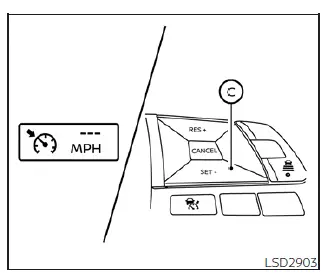
To establish your desired cruising speed, simply accelerate your Nissan Leaf to the velocity you wish to maintain, then press and release the SET-  switch. Upon activation, the cruise indicator will transition from gray to green, and the set vehicle speed indicator will appear on your cluster. You can then safely remove your foot from the accelerator pedal, and the vehicle will automatically maintain that specific speed.
- When you need to pass another vehicle, you may depress the accelerator pedal to increase speed; once you release the pedal, the Nissan Leaf will seamlessly return to your previously set cruising velocity.
- Please note that the vehicle may experience slight fluctuations in speed when traversing steep uphill or downhill gradients. If the system is unable to hold the target speed effectively due to terrain changes, you should be prepared to take manual control of the accelerator to maintain your desired pace.
You can cancel the preset cruising speed instantly using any of the following methods:
1. Press the CANCEL switch; the vehicle speed indicator will extinguish, though the system remains in standby mode.
2. Gently tap the brake pedal, which will immediately deactivate the speed control and turn off the vehicle speed indicator.
3. Toggle the ICC switch to the OFF position, which will deactivate both the cruise indicator and the vehicle speed indicator entirely.
To reset your cruising speed to a higher value, you may employ one of these three methods:
1. Accelerate manually using the pedal until you reach the new, higher speed, then press and release the SET- switch to lock it in.
2. Press and hold the RES+ switch; once the Nissan Leaf reaches your intended speed, release the switch to set it.
3. Quickly press and release the RES+ switch to incrementally increase your set speed. Each individual tap will raise the target velocity by approximately 1 mph (1.6 km/h).
To reset your cruising speed to a lower value, use one of the following approaches:
1. Lightly tap the brake pedal to disengage the current setting, then press and release the SET- switch once you have coasted down to your new desired speed.
2. Press and hold the SET- switch; release it as soon as the vehicle has decelerated to the target speed.
3. Quickly press and release the SET- switch. Each press will incrementally decrease the set speed by approximately 1 mph (1.6 km/h).
To resume your last saved preset speed, simply press and release the RES+ switch. The Nissan Leaf will automatically accelerate to return to the previously stored cruising speed, provided your current vehicle speed is above 25 mph (40 km/h).
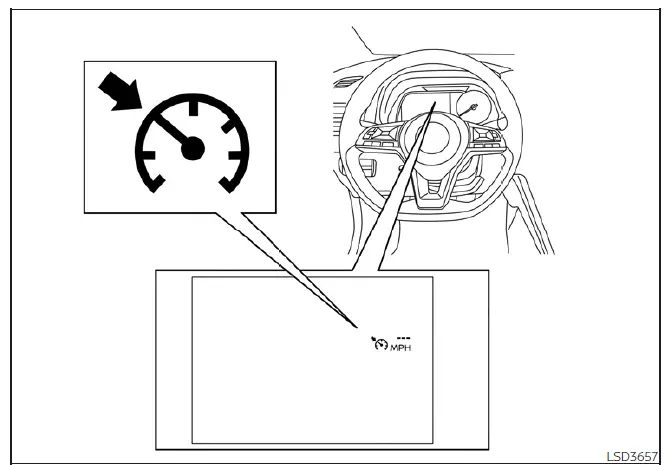
System temporarily unavailable
An audible chime will sound and the cruise control will automatically cancel if the system encounters the following conditions:
- Your vehicle speed drops more than 8 mph (13 km/h) below the currently set cruise speed.
- The shift lever is moved out of the D (Drive) or B mode position.
- The electronic parking brake is applied while driving.
- The Vehicle Dynamic Control (VDC) system, including the integrated traction control, engages to stabilize the vehicle.
- Significant wheel slippage is detected.
Should the system encounter an operational anomaly, an audible chime will sound, and the cruise indicator color will change to orange, signaling that the system is currently unavailable.
Action to take
If the cruise indicator turns orange, safely park your Nissan Leaf in a secure location, move the shift lever to the P (Park) position, and turn the EV system completely off. After a brief wait, restart the EV system, resume your drive, and attempt to re-engage the cruise control settings.
If you find it impossible to set the cruise speed, or if the indicator remains persistently orange, this may signal an underlying system malfunction. While your Nissan Leaf remains fully operational and safe to drive under normal conditions, the cruise control system requires professional attention. It is highly recommended that you schedule a service visit to a certified Nissan LEAF dealer to have the system inspected and corrected.
 System maintenance
The Intelligent Cruise Control (ICC) radar sensor for your Nissan Leaf is integrated directly into the front fascia, specifically positioned to provide a clear, unobstructed view ...
 ProPILOT Assist
WARNING
Failure to adhere strictly to the warnings and operational instructions regarding the proper use of the ProPILOT Assist system in your Nissan Leaf could result in loss of vehicle control, ...
Other materials:
Steering gear and linkage
Exploded View
REMOVAL
LHD Models
1. Steering gear assembly
2. Heat insulator
3. Front suspension member
: Vehicle front
: Always replace after every
disassembly.
: N·m (kg-m, ft-lb)
: N·m (kg-m, in-lb)
RHD Models
1. Steering gear assembly
2. Heat insulator
3. Front suspensio ...
Wiring diagram
MANUAL AIR CONDITIONING SYSTEM
Wiring Diagram
For connector terminal arrangements, harness layouts, and alphabets in a
(option abbreviation; if not
described in wiring diagram), refer to GI-12, "Connector Information/Explanation
of Option Abbreviation".
...
Rear wheel hub and housing
Exploded View
1. Axle housing
2. Suspension arm
3. Back plate
4. Hub bolt
5. Wheel hub assembly (Bearing-integrated
type)
6. Disc rotor
7. Plug
8. Wheel hub lock nut
9. Cotter pin
: Always replace after every
disassembly.
: N·m (kg-m, ft-lb)
Removal and Ins
REMOVAL
1. Remove ...
