
Nissan Juke Service and Repair Manual : Back door lock
Exploded View
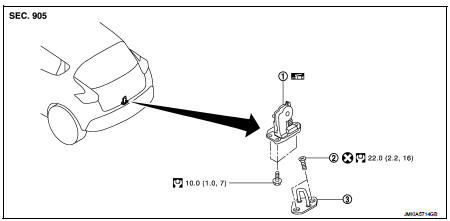
1. Back door lock assembly
2. TORX bolt
3. Back door striker
 : Do not reuse
 : N·m (kg-m, ft-lb)
 : Body grease
Door lock
DOOR LOCK : Removal and Installation
REMOVAL
1. Remove the back door lower finisher. Refer to INT-35, "BACK DOOR LOWER FINISHER : Removal and Installation".
2. Remove back door lock assembly mounting bolts.
3. Disconnect back door lock connector, and then remove back door lock assembly.
INSTALLATION
Note the following item, and install in the reverse order of removal.
CAUTION:
After installation, check back door open/close, and lock/unlock operation.
Emergency lever
EMERGENCY LEVER : Unlock procedures
UNLOCK PROCEDURES
NOTE
:
If back door lock cannot be unlocked due to a malfunction or battery discharge,
follow the procedures to
unlock back door.
1. Remove emergency lid. Refer to INT-36, "EMERGENCY LID : Removal and Installation".
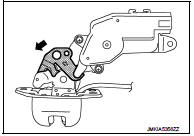
2. From inside the vehicle, rotate emergency lever toward lower direction and unlock.
 Rear door lock
Exploded View
1. Outside handle assembly
2. Rear door sealing screen
3. Door lock assembly
4. TORX bolt
5. Inside handle
: Clip
: Pawl
: Vehicle front
: Do not reuse
: N·m (kg-m, in-lb ...
 Fuel filler lid opener
Exploded View
1. Fuel filler lid opener cable
2. Cable protector
3. Fuel filler lid lock assembly
4. Fuel filler lid assembly
5. Spring
6. Bumper rubber
: Clip
: Do not reuse
Fuel fille ...
Other materials:
Periodic maintenance
Periodic Maintenance
The following tables show the normal maintenance schedule. Depending upon
weather and atmospheric conditions,
varying road surfaces, individual driving habits and vehicle usage, additional
or more frequent maintenance
may be required.
Periodic maintenance beyond the la ...
B1035 crash zone sensor
DTC Logic
DTC DETECTION LOGIC
DTC CONFIRMATION PROCEDURE
1.CHECK SELF-DIAG RESULT
With CONSULT-III
1. Turn ignition switch ON.
2. Perform “Self Diagnostic Result� mode of “AIR BAG� using CONSULT-III.
Without CONSULT-III
1. Turn ignition switch ON.
2. Check the air bag warning la ...
On board diagnostic (OBD) system
Description
This is an onboard diagnosis system which records diagnosis information
related to the exhaust gases. It
detects malfunctions related to sensors and actuators. The malfunctions are
indicated by means of the malfunction
indicator lamp (MIL) and are stored as DTC in the ECU memory. ...
