
Nissan Juke Service and Repair Manual : B2601 shift position
DTC Logic
DTC DETECTION LOGIC
NOTE
:
• If DTC B2601 is displayed with DTC U1000, first perform the trouble diagnosis
for DTC U1000. Refer to
BCS-83, "DTC Logic".
• If DTC B2601 is displayed with DTC U1010, first perform the trouble diagnosis for DTC U1010. Refer to BCS-84, "DTC Logic".
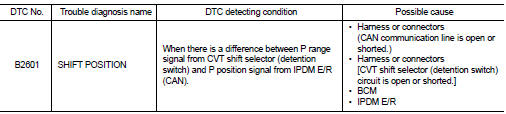
DTC CONFIRMATION PROCEDURE
1.PERFORM DTC CONFIRMATION PROCEDURE
1. Shift the selector lever to the P position.
2. Turn ignition switch ON and wait 2 seconds or more.
3. Shift the selector lever to any position other than P, and wait 2 seconds or more.
4. Check DTC in “Self Diagnostic Result� mode of “BCM� using CONSULT-III.
Is DTC detected? YES >> Go to SEC-79, "Diagnosis Procedure".
NO >> INSPECTION END
Diagnosis Procedure
1.CHECK CVT SHIFT SELECTOR POWER SUPPLY
1. Turn ignition switch OFF.
2. Disconnect CVT shift selector (detention switch) connector.
3. Check voltage between CVT shift selector (detention switch) harness connector and ground.

Is the inspection result normal? YES >> GO TO 4.
NO >> GO TO 2.
2.CHECK CVT SHIFT SELECTOR POWER SUPPLY CIRCUIT
1. Disconnect BCM connector.
2. Check continuity between CVT shift selector (detention switch) harness connector and BCM harness connector.

3. Check continuity between CVT shift selector (detention switch) harness connector and ground.

Is the inspection result normal? YES >> GO TO 3.
NO >> Repair or replace harness.
3.REPLACE BCM
1. Replace BCM. Refer to BCS-93, "Removal and Installation".
2. Perform initialization of BCM and registration of all Intelligent Keys using CONSULT-III.
For initialization and registration procedures, refer to CONSULT-III Operation Manual NATS-IVIS/NVIS.
>> INSPECTION END
4.CHECK CVT SHIFT SELECTOR CIRCUIT (IPDM E/R)
1. Disconnect IPDM E/R connector.
2. Check continuity between CVT shift selector (detention switch) harness connector and IPDM E/R harness connector.

Is the inspection result normal? YES >> GO TO 5.
NO >> Repair or replace harness.
5.CHECK CVT SHIFT SELECTOR CIRCUIT (BCM)
1. Disconnect BCM connector.
2. Check continuity between CVT shift selector (detention switch) harness connector and BCM harness connector.

3. Check continuity between CVT shift selector (detention switch) harness connector and ground.

Is the inspection result normal? YES >> GO TO 6.
NO >> Repair or replace harness.
6.REPLACE BCM
1. Replace BCM. Refer to BCS-93, "Removal and Installation".
2. Perform initialization of BCM and registration of all Intelligent Keys using CONSULT-III.
For initialization and registration procedures, refer to CONSULT-III Operation Manual NATS-IVIS/NVIS.
3. Perform DTC CONFIRMATION PROCEDURE for DTC B2601. Refer to SEC-79, "DTC Logic".
Is DTC B2601 detected again? YES >> Replace IPDM E/R. Refer to PCS-34, "Removal and Installation".
NO >> INSPECTION END
 B2557 vehicle speed
DTC Logic
DTC DETECTION LOGIC
NOTE:
• If DTC B2557 is displayed with DTC U1000, first perform the trouble diagnosis
for DTC U1000. Refer to
BCS-83, "DTC Logic".
• If DTC B2557 is ...
 B2602 shift position
DTC Logic
DTC DETECTION LOGIC
NOTE:
• If DTC B2602 is displayed with DTC U1000, first perform the trouble diagnosis
for DTC U1000. Refer to
BCS-83, "DTC Logic".
• If DTC B2602 is ...
Other materials:
Brake booster
Inspection
OPERATION
Depress the brake pedal several times at 5-second intervals with the engine
stopped. Start the engine with the
brake pedal fully depressed. Check that the clearance between brake pedal and
dash lower panel decreases.
NOTE:
A slight impact with a small click may be fel ...
Unlock link function does not operate
Diagnosis Procedure
1.CHECK DRIVER SIDE OR PASSENGER SIDE DOOR SWITCH
Check driver side or passenger side door switch.
Refer to DLK-258, "Component Function Check".
Is the inspection result normal?
YES >> GO TO 2.
NO >> Repair or replace the malfunctioning parts.
...
P0078 EVT control solenoid valve
DTC Logic
DTC DETECTION LOGIC
DTC CONFIRMATION PROCEDURE
1.PRECONDITIONING
If DTC Confirmation Procedure has been previously conducted, always perform
the following procedure
before conducting the next test.
1. Turn ignition switch OFF and wait at least 10 seconds.
2. Turn ignition swit ...
