
Nissan Juke Service and Repair Manual : Antenna feeder
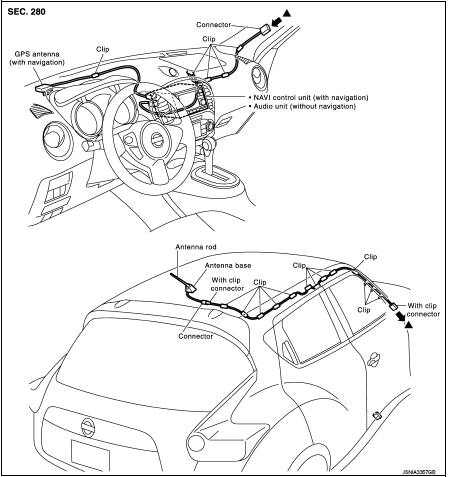
Feeder Layout
 USB connector and AUX jack
Removal and Installation
REMOVAL
1. Remove cluster tray. Refer to IP-12, "Exploded View".
2. Push the pawl from the back of cluster tray to remove USB connector and AUX
jack.
INSTALL ...

Other materials:
Inside mirror
Exploded View
Manual anti-dazzling type
1. Windshield glass
2. Mirror base
3. Inside mirror assembly
: Do not reuse
Auto anti-dazzling type
1. Rain sensor bracket
2. Mirror base
3. Rain sensor
4. Inside mirror assembly
: Pawl
: Do not reuse
Removal and Installation
CAUTION:
Ne ...
Bluetooth® Hands-Free Phone System
WARNING
• Use a phone after stopping your vehicle in a safe location. If you have
to use a phone while driving, exercise extreme caution at all times so full attention
may be given to vehicle operation.
• If you find yourself unable to devote full attention to vehicle operation while
tal ...
Unit disassembly and assembly
Torque converter and converter housing oil seal
Exploded View
1. Transaxle assembly
2. Converter housing oil seal
3. Torque converter
: Always replace after every
disassembly.
: Apply CVT Fluid NS-2.
Disassembly
1. Remove transaxle assembly. Refer to TM-301, "Removal and Installat ...
