
Nissan Juke Service and Repair Manual : Water hose
Exploded View
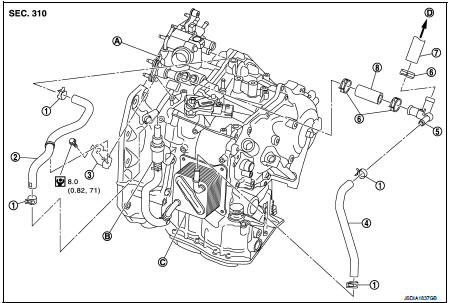
1. Hose clamp
2. Water hose A
3. Water hose B
4. Water hose B
5. Water bypass pipe
6. Hose clamp
7. Heater hose
8. Water hose C
A. Water outlet
B. Heater thermostat
C. Oil warmer
D. Heater core
 : N·m (kg-m, in-lb)
Removal and Installation
REMOVAL
WARNING:
Never remove the radiator cap when the engine is hot. Serious burns could occur
from high pressure
coolant escaping from the radiator.
CAUTION:
Perform these steps after the coolant temperature has cooled sufficiently.
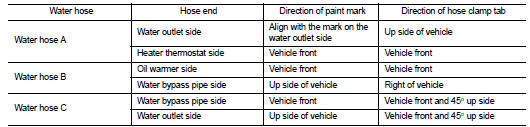
1. Remove the hose clamp and pull out the water hose A.
2. Remove the hose clamp and pull out the water hose B.
3. Remove the hose clamp and pull out the water hose C.
4. Pull out the heater hose and remove the water bypass pipe. Refer to CO-52, "Exploded View".
5. Remove the bracket.
INSTALLATION
Note the following, and install in the reverse order of removal.
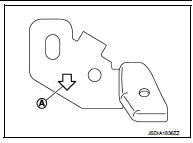
• To install bracket to the CVT assembly, face the from arrow (A) of the bracket ahead of the vehicle.
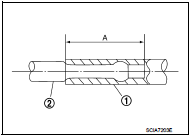
• When installing water hose (1) to tube (2), refer to insertion length “A� below.
Insertion length “A� : 27 mm (1.06 in)
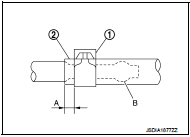
• When hose clamp (1) is installed on CVT water hose (2), refer to dimension “A� below.
Dimension“A� : 5 – 7 mm (0.20 – 0.28 in)
• The hose clamp should not come on bulge (B).
Inspection
INSPECTION AFTER INSTALLATION
Start the engine, and check the joints for coolant leakage.
 Differential side oil seal
Exploded View
1. Transaxle assembly
2. Differential side oil seal (left side)
3. Differential side oil seal (right side)
: Vehicle front
: Always replace after every
disassembly.
: Genuine N ...
 Fluid cooler system
Exploded View
1. Bracket
2. Bracket
3. Bracket
4. CVT fluid cooler
5. Clamp
6. CVT fluid cooler hose C
7. CVT fluid cooler hose B
8. CVT fluid cooler tube assembly
9. CVT fluid cooler ...
Other materials:
P0138 HO2S2
DTC Logic
DTC DETECTION LOGIC
The heated oxygen sensor 2 has a much longer switching time between rich and
lean than the air fuel ratio (A/
F) sensor 1. The oxygen storage capacity of the three way catalyst 1 causes the
longer switching time.
MALFUNCTION A
To judge the malfunctions of hea ...
Evap canister
2WD : Hydraulic Layout
EVAPORATIVE EMISSION LINE DRAWING
1.EVAP canister purge volume control
solenoid valve
2. EVAP canister
3. EAVP line
4. Fuel line
NOTE:
Do not use soapy water or any type of solvent while installing vacuum hose or
purge hoses.
2WD : Removal and Installation
REMOV ...
Key ID warning does not operate
Diagnosis Procedure
1.CHECK DTC WITH BCM AND COMBINATION METER
Check that DTC is not detected with BCM and combination meter.
Is the inspection result normal?
YES >> GO TO 2.
NO-1 >> Refer to BCS-67, "DTC Index". (BCM)
NO-2 >> Refer to MWI-36, "DTC Index&qu ...
