
Nissan Leaf 2018-2025 (ZE1) Owner's Manual : USB/iPod charging ports
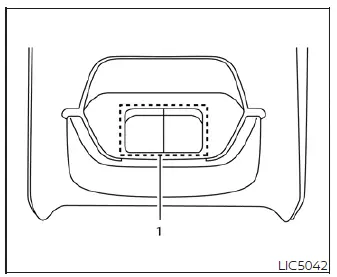
- Type-A USB connection and charging port
There are dedicated USB/iPod charging ports conveniently located behind the center console for rear passengers. These ports are designed to charge compatible devices and mobile phones quickly while traveling in your Nissan Leaf.
NOTE:
- Only the primary USB connection port located below the main instrument panel will allow full operation and integration of your USB/iPod devices through the vehicle's multimedia audio system. The rear ports are strictly for power supply and charging.
- For best charging results, it is highly recommended to use the original manufacturer cables that came with your device, which are sold separately. A specialized USB Type-C to USB Type-A adapter could be utilized if your device uses a Type-C cable; however, charging performance and results may vary.
 Power outlet
CAUTION
The 12-volt power outlet and the plug of the connected accessory may become hot during or immediately after use. Always handle them with care to avoid mino ...
 Storage
...
Other materials:
Clutch pedal
LHD : Exploded View
1. Clutch pedal
2. Stopper rubber
3. Clip
4. Clutch interlock switch *1
5. Clutch pedal position switch *2
6. Pedal pad
7. Pedal stopper rubber
*1 : With push-button ignition switch system
*2 : With ASCD or with push-button ignition switch system
: N·m (kg-m, ft- ...
A/C unit assembly
Exploded View (Automatic Air Conditioning)
REMOVAL
LHD models (4WD)
1. A/C unit assembly
2. Drain hose
3. Steering member
4. Instrument stay
: Clip
: N·m (kg-m, ft-lb)
DISASSEMBLY
LHD models (4WD)
1. Ventilator seal
2. Defroster seal
3. Upper attachment case
4. Sub defroster d ...
Side oil seal
Removal and Installation
REMOVAL
1. Remove front drive shafts. (MR16DDT) Refer to FAX-22, "LEFT SIDE : Removal
and Installation" (LEFT
SIDE) and FAX-24, "RIGHT SIDE : Removal and Installation" (RIGHT SIDE).
2. Remove front drive shafts. (K9K) Refer to FAX-78, "LEFT SID ...
