
Nissan Juke Service and Repair Manual : Side oil seal
Removal and Installation
REMOVAL
1. Remove front drive shafts. (MR16DDT) Refer to FAX-22, "LEFT SIDE : Removal and Installation" (LEFT SIDE) and FAX-24, "RIGHT SIDE : Removal and Installation" (RIGHT SIDE).
2. Remove front drive shafts. (K9K) Refer to FAX-78, "LEFT SIDE : Removal and Installation" (LEFT SIDE) and FAX-79, "RIGHT SIDE : Removal and Installation" (RIGHT SIDE).
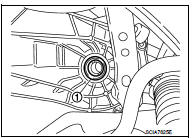
3. Remove differential side oil seals (1) from clutch housing and transaxle case, using an oil seal remover.
CAUTION:
Never damage transaxle case and clutch housing.
INSTALLATION
Note the following, and install in the reverse order of removal.
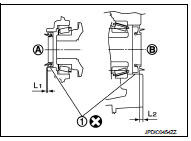
• Install differential side oil seals (1) to clutch housing and transaxle case, using the drift [Stamping number: B.vi 1666-B] of the drift set [SST: KV32500QAA].
A : Transaxle case side B : Clutch housing side
Dimension “L1� : 1.2 – 1.8 mm (0.047 – 0.071 in) Dimension “L2� : 2.7 – 3.3 mm (0.106 – 0.130 in)
CAUTION:
• Never incline differential side oil seal.
• Never damage clutch housing and transaxle case.
Inspection
INSPECTION AFTER INSTALLATION
Check the oil level and oil leakage. Refer to TM-75, "Inspection".

 Position switch
Removal and Installation
REMOVAL
1. Remove air cleaner case. (K9K) Refer to EM-280, "Removal and
Installation".
2. Remove battery. (MR16DDT) Refer to PG-124, "Removal and Installat ...
Other materials:
Electric foldable door mirror does not operate
Diagnosis Procedure
1.CHECK DOOR MIRROR (OPEN/CLOSE MOTOR) CIRCUIT
Check door mirror (open/close motor) circuit.
Refer to MIR-25, "Component Function Check".
Is the inspection result normal?
YES >> GO TO 2.
NO >> Repair or replace the malfunctioning parts.
2.CONF ...
Unlock sensor
Component Function Check
1.CHECK FUNCTION
1. Select “DOOR LOCK� of “BCM� using CONSULT-III.
2. Select “LOCK STATUS� in “DATA MONITOR� mode.
3. Check that the function operates normally according to the following
conditions.
Is the inspection result normal?
YES >> Unlo ...
Engine Oils
Prolonged and repeated contact with used engine oil may cause skin cancer.
Try to avoid direct skin contact
with used oil.
If skin contact is made, wash thoroughly with soap or hand cleaner as soon as
possible.
HEALTH PROTECTION PRECAUTIONS
• Avoid prolonged and repeated contact with oil ...
