
Nissan Juke Owners Manual : Turn signal switch
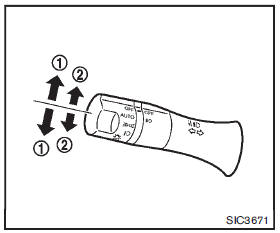
1 Turn signal
Move the lever up or down to signal the turning direction. When the turn is completed, the turn signals cancel automatically.
2 Lane change signal
To indicate a lane change, move the lever up or down to the point where lights begin flashing.
 Headlight switch
Lighting
1 Turn the switch to the position:
The front parking, side marker, tail, license plate, instrument lights and daytime
running lights (for NISMO models) will come on.
2 Turn the switch ...
 Fog light switch (if so equipped)
To turn the fog lights on, turn the headlight switch to the
position, then turn the switch to the
position. To turn them off, turn the
switch to the OFF position.
The headlights must be on fo ...
Other materials:
Remote keyless entry receiver
Component Function Check
1.CHECK FUNCTION
1. Select “DOOR LOCK� of “BCM� using CONSULT-III.
2. Select “KEYLESS � or “KEYLESS UNLOCK� in “DATA MONITOR� mode.
3. Check that the function operates normally according to the following
conditions.
Is the inspection result norma ...
B26FC key registration
DTC Logic
DTC DETECTION LOGIC
DTC CONFIRMATION PROCEDURE
1.PERFORM DTC CONFIRMATION PROCEDURE
1. Perform initialization of BCM and reregistration of all Intelligent Keys
using CONSULT-III.
For initialization and registration procedures, refer to CONSULT-III Operation
Manual NATS-IVIS/NV ...
Vehicle load capacity
Do not exceed the load limit of your vehicle shown as “The combined weight of
occupants and cargo� on the Tire and Loading Information label. Do not exceed the
number of occupants shown as “Seating Capacity� on the Tire and Loading Information
label.
To get “the combined weight of o ...
