
Nissan Leaf 2018-2025 (ZE1) Owner's Manual : Timer Display
To provide you with immediate visibility into your vehicle's energy status, the timer display automatically activates for approximately 30 seconds as soon as you place the power switch of your Nissan Leaf in the OFF position.
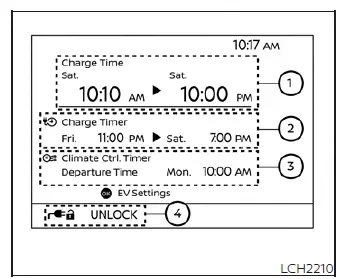
- Charging time
This section provides a clear view of the estimated start and end times for your current charging session, allowing you to manage your schedule with confidence.
- When the charging timer is active, the Nissan Leaf system dynamically calculates the estimated duration required to charge the Li-ion battery. This calculation is based on the electrical power supplied during the previous timer-based charging session, providing you with an accurate projection of the start and end times.
- These estimates may be subject to recalculation immediately after you connect the charge cable to reflect the actual electrical power available at your specific charging location. If the updated estimate differs from what you saw when you first powered down the vehicle, please note that this is a normal system adjustment and not an indication of a malfunction.
- When the charging timer function is set to OFF, the display provides the estimated completion time for an immediate charge. In this state, the end time is calculated based on the charging power parameters you have selected in the "Charge Time Screen."
- Once the Li-ion battery has reached a full state of charge, the system will indicate the completion by displaying the charging time as "--:--".
- Charging timer setting status
This indicator provides a quick glance at whether your charging timer is enabled, confirming the specific start and end times that will govern your next charge.
- Climate Ctrl. timer setting status
When the Climate Control timer is configured, the display clearly shows the target departure time (end time) you have established to ensure your cabin is at the perfect temperature before you head out.
- Charge connector lock setting status
The display provides real-time status of your charge connector lock system, showing whether it is currently set to AUTO, LOCK, or UNLOCK mode. For a deeper understanding of how these security modes function, please refer to the "Charge connector lock system" section of your owner's manual.
By pressing the OK button on your steering wheel, you can instantly transition to the "EV Settings" menu, where you can modify your charging timer, Climate Control timer, and lock mode preferences to suit your immediate needs.
If you prefer to see your driving performance data, pressing the  button while the timer display is active will switch the view to your ECO Drive Report, provided the Nissan Leaf was driven during your recent trip.
Whichever screen you have selected, it will remain visible for another 30 seconds after your last input. Please be aware that if you lock the vehicle doors after powering down, the display will turn off ahead of the 30-second timer to conserve energy. For models equipped with a Navigation System, the display will also include the day of the week alongside the time information for each of your active timers.
Additionally, please consider the following operating conditions that influence how charging time information is presented:
- The system displays charging duration in 10-minute increments; if the estimated requirement exceeds 24 hours, the display will show "Over 24h."
- If you connect your Nissan Leaf with the intention of starting a session immediately, the start time will be clearly labeled as "Charge Now."
- During an active charge, the start time reflects the actual moment charging commenced, while the end time is a live estimation based on the power currently being supplied.
- On models featuring a Li-ion battery warmer, the system accounts for the power required to reach optimal battery temperatures. If the battery is cold, you may notice a longer estimated charging time displayed.
- If you have enabled "Chg. Timer Only at HOME" in your EV Settings, the timer start time will only appear when you power down the vehicle at your registered home location. If you power down elsewhere, the system defaults to immediate charge mode, displaying "Charge Now."
- If "Full charge has priority" is enabled and the battery cannot be fully replenished within your scheduled timer window, the system will extend the session, and the display will show the additional time required beyond your original schedule.
- To view a more granular estimate based on the specific electrical power currently available to your charger, please consult the dedicated Estimated Charge Time screen.
NOTE:
- Please remember that all displayed end times are estimations. External factors may occasionally result in the Li-ion battery not reaching a completely full level by the exact estimated time.
- If both the charging timer and the Climate Control timer are scheduled for the same period, you may notice a longer overall charging time, as the system must balance energy distribution, which could affect the final charge level at the scheduled departure time.
 Charging timer
Optimize your energy management and utility costs by utilizing the charging timer feature of the Nissan Leaf. This function allows you to create custom schedules for your vehicle's Li-ion battery char ...
 Immediate charge
When you haven't enabled a charging timer, your Nissan Leaf is designed to begin charging automatically the moment you connect a normal or trickle charge connector to the vehicle's charge port. This e ...
Other materials:
Front door
Exploded View
1. Front door panel
2. Grommet
3. TORX bolt
4. Door striker
5. Door pad
6. Bumper rubber
7. Door check link
8. Door hinge (lower)
9. Door hinge (upper)
10. Grommet
: Do not reuse
: N·m (kg-m, in-lb)
: N·m (kg-m, ft-lb)
: Body grease
Door assembly
DOOR ASSEMBLY ...
Air fresheners
Most air fresheners use a solvent that could affect the vehicle interior. If
you use an air freshener, take the following precautions:
• Hanging-type air fresheners can cause permanent discoloration when they contact
vehicle interior surfaces. Place the air freshener in a location that allows ...
Front door lock
Exploded View
1. Door key cylinder assembly (driver
side)
Outside handle escutcheon (passenger
side)
2. Rear gasket
3. Outside handle bracket
4. TORX bolt
5. Key rod (driver side)
6. Door lock assembly
7. Inside handle
8. Outside handle
9. Front gasket
10. Cable clip
: Pawl
: V ...
