
Nissan Juke Service and Repair Manual : Sill cover
Exploded View
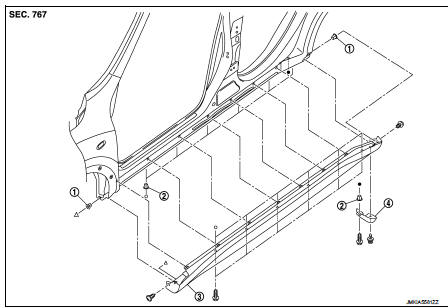
1. Screw grommet
2. Screw grommet
3. Sill cover
4. Wind defle
Removal and Installation
REMOVAL
1. Remove sill cover front end fixing screw (A).
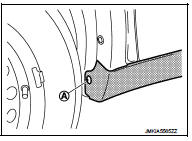
2. Remove sill cover rear end fixing screw (A).
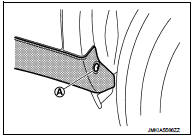
3. Remove sill cover lower side fixing screws.
4. Fully open front door and rear door.
5. Remove clips from sill cover back side with a remover tool (A).
 : Clip
CAUTION:
Apply protective tape (B) on the body to protect the painted
surface from damage.
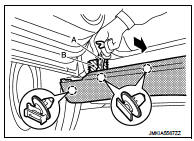
6. Remove sill cover form body side.
INSTALLATION
Note the following item, and then install in the reverse order of removal.
CAUTION:
When installing sill cover, check that clips are securely fitted in body panel
holes, and then press clips
in.
 Fender protector
Exploded View
1. Hoodledge insurator
2. Fender protector
3. U nut
4. Air guide
5. Screw grommet
A. To hoodledge panel
: Vehicle front
Removal and Installation
REMOVAL
1. Remove front fi ...
 Floor side fairing
Exploded View
1. Push spring nut
2. Floor under cover RH
3. Floor under cover LH
Removal and Installation
REMOVAL
FLOOR UNDER COVER
Remove floor under cover mounting nut and push spring nut ...
Other materials:
U1117 lost communication (ABS)
Description
CAN (Controller Area Network) is a serial communication line for real-time
application. It is an on-vehicle multiplex
communication line with high data communication speed and excellent malfunction
detection ability.
Many electronic control units are equipped onto a vehicle, and ...
U0300 can communication data
Description
CAN (Controller Area Network) is a serial communication line for real-time
application. It is an on-vehicle multiplex
communication line with high data communication speed and excellent malfunction
detection ability.
Many electronic control units are equipped onto a vehicle, and ...
RCTA system operation
Side Indicator Light
The RCTA system acts as an extra set of eyes, helping to alert the driver to approaching traffic while reversing out of a parking stall or driveway.
The system becomes active when the shift position is set to R (Reverse) ...
