
Nissan Juke Service and Repair Manual : Secondary speed sensor
Exploded View
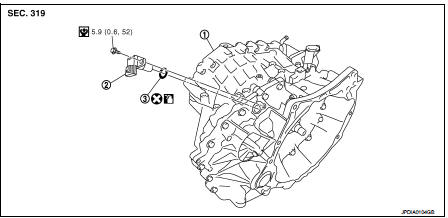
1. Transaxle assembly 2. Secondary speed sensor 3. O-ring
 : Always replace after every
disassembly.
 : N·m (kg-m, in-lb)
 : Genuine NISSAN CVT Fluid NS-2
Removal and Installation
REMOVAL
1. Remove air cleaner case. Refer to EM-26, "Removal and Installation".
2. Remove secondary speed sensor connector.
3. Remove secondary speed sensor.
4. Remove O-ring from secondary speed sensor.
INSTALLATION
Note the following, and install in the reverse order of removal.
CAUTION:
• Never reuse O-ring.
• Apply CVT fluid to O-ring.
Inspection and Adjustment
INSPECTION AFTER INSTALLATION
Check for CVT fluid leakage. Refer to TM-480, "Inspection".
ADJUSTMENT AFTER INSTALLATION
Adjust the CVT fluid level. Refer to TM-379, "Adjustment".
 Primary speed sensor
Exploded View
1. Transaxle assembly
2. O-ring
3. Primary speed sensor
: Always replace after every
disassembly.
: N·m (kg-m, in-lb)
: Genuine NISSAN CVT Fluid NS-2
Removal and Installati ...
 Differential side oil seal
Exploded View
1. Transaxle assembly
2. Differential side oil seal (left side)
3. Differential side oil seal (right side)
: Always replace after every
disassembly.
: Genuine NISSAN CVT Fluid ...
Other materials:
B263D, B263E, B263F intake door motor
DTC Logic
DTC DETECTION LOGIC
DTC CONFIRMATION PROCEDURE
1.PERFORM DTC CONFIRMATION PROCEDURE
With CONSULT-III
1. Turn ignition switch ON.
2. Select “Self Diagnostic Result� mode of “HVAC� using CONSULT-III.
3. Check DTC.
Is DTC detected?
YES >> Refer to HAC-159, "Dia ...
C1105, C1106, C1107, C1108 wheel sensor
DTC Logic
DTC DETECTION LOGIC
DTC CONFIRMATION PROCEDURE
1.PRECONDITIONING
If “DTC CONFIRMATION PROCEDURE� has been previously conducted, always turn
ignition switch OFF and
wait at least 10 seconds before conducting the next test.
>> GO TO 2.
2.CHECK DTC DETECTION
With CONSU ...
Auto door lock operation does not operate
Diagnosis Procedure
1.CHECK “AUTO LOCK SET� SETTING WITH CONSULT-III
1. Select “MULTI REMOTE ENT� of “BCM� using CONSULT-III.
2. Select “AUTO LOCK SET� in “WORK SUPPORT� mode.
3. Check “AUTO LOCK SET� in “WORK SUPPORT�.
Refer to DLK-372, "MULTI REMOTE ENT : CO ...
