
Nissan Juke Owners Manual : Replacing
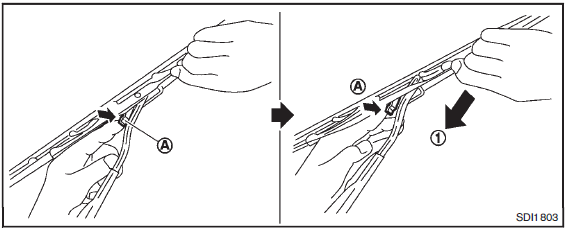
Replace the wiper blades if they are worn.
Before replacing the wiper blades, the wiper should be in the fully up position to avoid scratching the engine hood or damaging the wiper arm. To pull up the wiper arm, see “Windshield wiper and washer switch� .
1. Lift the wiper arm away from the windshield.
2. Push and hold the release tab A , and move the wiper blade down the wiper arm 1 .
3. Insert the new wiper blade onto the wiper arm until a click sounds.
4. Rotate the wiper blade so that the dimple is in the groove.
CAUTION
• After wiper blade replacement, return the wiper arm to its original position; otherwise it may be damaged when the hood is opened.
• Make sure the wiper blades contact the glass; otherwise the arm may be damaged from wind pressure.
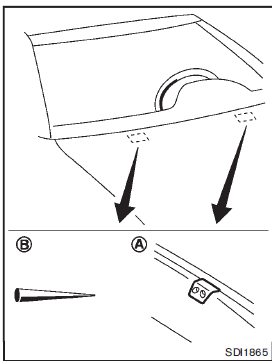
Be careful not to clog the washer nozzle A .
This may cause improper windshield washer operation. If the nozzle is clogged, remove any objects with a needle or small pin B . Be careful not to damage the nozzle.
 Cleaning
If your windshield is not clear after using the windshield washer or if a wiper
blade chatters when running, wax or other material may be on the blade or windshield.
Clean the outside of the windsh ...
 Rear window wiper blade
Contact a NISSAN dealer if checking or replacement is required. ...
Other materials:
P1554 battery current sensor
DTC Logic
DTC DETECTION LOGIC
DTC CONFIRMATION PROCEDURE
1.PERFORM COMPONENT FUNCTION CHECK
Perform component function check. Refer to EC-709, "Component Function
Check".
NOTE:
Use component function check to check the overall function of the battery
current sensor circuit. D ...
Light & rain sensor
Exploded View
CAUTION:
When the light & rain sensor is removed from windshield, the light & rain sensor
cannot be re-used.
REMOVAL
1. Light & rain sensor bracket
2. Mirror base
3. Light & rain sensor
4. Inside mirror assembly
: Pawl
: Do not reuse
Removal and Installa ...
Intelligent Forward Collision Warning (I-FCW)
WARNING
The Intelligent Forward Collision Warning (I-FCW) system is a supportive safety feature; failing to adhere to the provided operational instructions or relying solely on this technology could result in a severe collision, causing serious injury or death.
While the I-FCW sy ...
