
Nissan Juke Service and Repair Manual : Removal and installation
MULTI DISPLAY UNIT
Exploded View
REMOVAL
Refer to IP-12, "Exploded View".
DISASSEMBLY
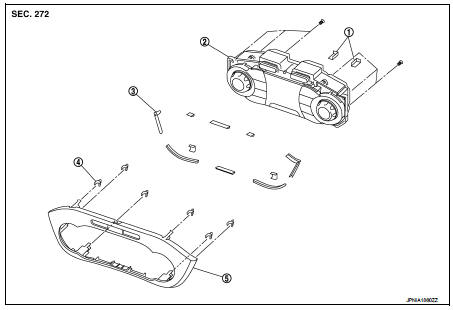
1. Silencer tape
2. Multi display unit
3. Silencer tape
4. Clip
5. Control finisher
Removal and Installation
REMOVAL
Refer to IP-12, "Exploded View".
CAUTION:
• When performing the work, use a shop cloth to protect the parts from damage.
• Always fix the harness clamp in position.
INSTALLATION
Install in the reverse order of removal.
 Basic inspection
DIAGNOSIS AND REPAIR WORK FLOW
Work Flow
DESCRIPTION OF TROUBLE DIAGNOSIS FLOWCHART
DETAILS OF TROUBLE DIAGNOSIS FLOWCHART
1.OBTAIN INFORMATION ABOUT SYMPTOM
Interview the customer to obtain as ...
 Maintenance
...
Other materials:
P0746 pressure control solenoid A
Description
The line pressure solenoid valve regulates the oil pump discharge pressure to
suit the driving condition in
response to a signal sent from the TCM.
DTC Logic
DTC DETECTION LOGIC
DTC CONFIRMATION PROCEDURE
CAUTION:
Always drive vehicle at a safe speed.
NOTE:
If “DTC CONFIRM ...
B26F0 steering lock relay
DTC Logic
DTC DETECTION LOGIC
NOTE:
• If DTC B26F0 is displayed with DTC U1000, first perform the trouble diagnosis
for DTC U1000. Refer to
BCS-83, "DTC Logic".
• If DTC B26F0 is displayed with DTC U1010, first perform the trouble diagnosis
for DTC U1010. Refer to
BCS-84, &qu ...
Waxing
Regular waxing protects the paint surface and helps retain new vehicle appearance.
Polishing is recommended to remove built-up wax residue and to avoid a weathered
appearance before reapplying wax.
A NISSAN dealer can assist you in choosing the proper product.
• Wax your vehicle only after a ...
