
Nissan Juke Service and Repair Manual : Removal and installation
COMBINATION METER
Exploded View
REMOVAL
Refer to IP-12, "Exploded View".
DISASSEMBLY
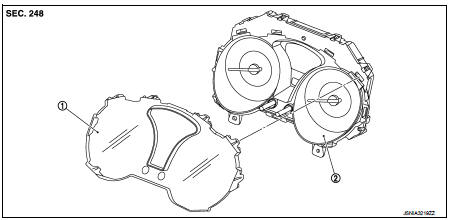
1. Front cover
2. Unified meter control unit
Removal and Installation
REMOVAL
1. Remove cluster lid A. Refer to IP-13, "Removal and Installation".
2. Remove the mounting screws of the combination meter.
3. Pull the combination meter straight to disengage resin clips.
(The figure shows the clip positions on the back of the combination
meter.)
CAUTION:
Never damage the front cover.
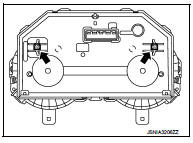
4. Turn the lower part of the combination meter in the direction of the arrow to remove the combination meter from the instrument panel assembly.
CAUTION:
Never damage the front cover.
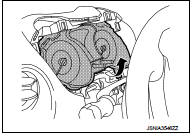
5. Remove connector to remove the combination meter.
CAUTION:
Never damage the front cover.
INSTALLATION
Install in the reverse order of removal.
Disassembly and Assembly
DISASSEMBLY
1. Disengage the pawls (2 on the sides, 3 on the lower part) of the combination meter.
2. Insert the removal tool into the clearance (in the order of A, B) between the front cover and the meter control unit. Remove 4 pawls on the upper side of the front cover by turning the tool while increasing the clearance.
CAUTION:
Wrap the removal tools with protective tape to prevent
scratches.
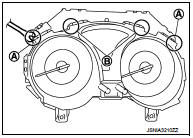
3. Pull the front cover straight to remove it from the meter control unit assembly.
CAUTION:
Never damage the front cover.
Never touch the pointer and the crystalline liquid.
ASSEMBLY
Install the front cover straight to the meter control unit assembly and engage all the pawl.
CAUTION:
Never damage the front cover.
 Normal operating condition
INFORMATION DISPLAY
INFORMATION DISPLAY : Description
AMBIENT TEMPERATURE
The displayed ambient temperature on the information display may differ from
the actual temperature because
it is a corr ...

Other materials:
Interior room lamp control system
Wiring Diagram
For connector terminal arrangements, harness layouts, and alphabets in a
(option abbreviation: if not
described in wiring diagram), refer to GI-12, "Connector Information/Explanation
of Option Abbreviation".
...
Both side front fog lamps are not turned on
Description
The front fog lamps are not turned ON in any condition.
Diagnosis Procedure
1.CHECK FUSE
Check that the following fuse is fusing.
Is the inspection result normal?
YES >> GO TO 2.
NO >> Repair the applicable circuit. And then replace the fuse.
2.COMBINATION SWITC ...
Reservoir tank cap
Inspection
• Check valve seat of reservoir tank cap.
- Check if valve seat (A) is swollen to the extent that the edge of the
metal plunger (B) cannot be seen when watching it vertically from
the top.
- Check if valve seat has no soil and damage.
• Pull negative-pressure valve to open i ...
