
Nissan Juke Service and Repair Manual : Removal and installation
PUSH-BUTTON IGNITION SWITCH
Removal and Installation
REMOVAL
1. Remove the NATS antenna amp. Refer to SEC-167, "Removal and Installation".
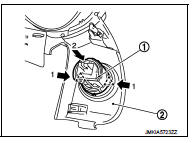
2. Remove the push-button ignition switch.
1. Disengage the push-button ignition switch fixing pawls using minus driver etc.
2. Press the push-button ignition switch to remove it from cluster lid A (2).
 : Pawl
INSTALLATION
Install in the reverse order of removal.
 Push-button ignition switch position indicator does not illuminate
Description
• Before performing the diagnosis in the following table, check “Work Flow�.
Refer to PCS-88, "Work Flow".
• Check that vehicle is under the condition shown in “Con ...
 Charging System
...
Other materials:
Does not operate
Description
ABS function and EBD function does not operate.
Diagnosis Procedure
CAUTION:
ABS function and EBD function never operate when the vehicle speed is 10 km/h
(6.2 MPH) or less.
1.CHECK ABS WARNING LAMP
Check that ABS warning lamp and brake warning lamp turn ON and turn OFF
appro ...
Positive crankcase ventilation
Inspection
1.CHECK PCV VALVE
With engine running at idle, remove PCV valve from rocker cover. A
properly working valve makes a hissing noise as air passes through
it. A strong vacuum should be felt immediately when a finger is
placed over valve inlet.
Is the inspection result normal?
YES &g ...
Heated seats (if so equipped)
WARNING
Do not use or allow occupants to use the seat heater if you or the occupants
cannot monitor elevated seat temperatures or have an inability to feel pain in body
parts that contact the seat. Use of the seat heater by such people could result
in serious injury.
CAUTION
• The battery ...
