
Nissan Juke Service and Repair Manual : Removal and installation
IPDM E/R
Exploded View
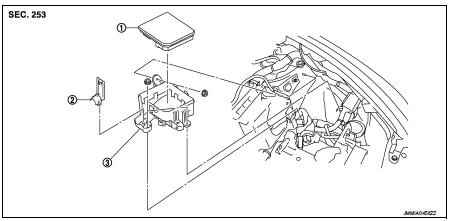
1. IPDM E/R cover A
2. IPDM E/R
3. IPDM E/R cover B
Removal and Installation
IPDM E/R integrated relays are not serviceable parts, and must not be removed from the unit.
REMOVAL
1. Remove battery.
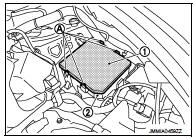
2. Press and expand pawls (A) on lateral side of IPDM E/R cover and remove IPDM E/R (1) from IPDM E/R cover B (2).
3. Disconnect the harness connector and then remove the IPDM E/R.
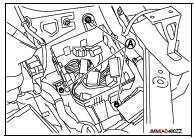
4. Remove IPDM E/R cover B mounting nuts (A).
5. Insert a flat-bladed screwdriver between IPDM E/R cover A (1) and IPDM E/R cover B (2), disengage pawls, and remove IPDM E/R cover A.
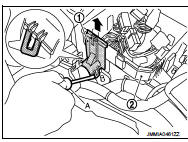
6. Remove IPDM E/R cover B.
INSTALLATION
Install in the reverse order of removal.
 Power supply and ground circuit
Diagnosis Procedure
1.CHECK FUSES AND FUSIBLE LINK
Check that the following IPDM E/R fuses or fusible links are not blown.
Is the fuse fusing?
YES >> Replace the blown fuse or fusible link ...

Other materials:
Refrigerant pressure sensor
Component Function Check
1.CHECK REFRIGERANT PRESSURE SENSOR OVERALL FUNCTION
1. Start engine and warm it up to normal operating temperature.
2. Turn A/C switch and blower fan switch ON.
3. Check the voltage between ECM harness connector and ground.]
Is the inspection result normal?
YES > ...
Drive pinion
Exploded View
1. Pinion lock nut
2. Companion flange
3. Drive pion oil seal
4. Pinon rear bearing
5. Transfer case
6. Gasket
7. Filler plug
8. Collapsible spacer
9. Drive pinion adjust shim
10. Drive pinion
11. Pinion front bearing
12. Ring gear
13. Ring gear shaft
14. Ring ...
B1024 pass A/B deact SW
DTC Logic
DTC DETECTION LOGIC
DTC CONFIRMATION PROCEDURE
1.CHECK SELF-DIAGNOSTIC RESULT
With CONSULT-III
1. Turn ignition switch ON.
2. Perform “Self Diagnostic Result� mode of “AIR BAG� using CONSULT-III.
Without CONSULT-III
1. Turn ignition switch ON.
2. Check the air bag warn ...
