
Nissan Juke Service and Repair Manual : Removal and Installation
REMOVAL
1. Separate the rear propeller shaft. Refer to DLN-121, "Removal and Installation".
2. Remove right side drive shaft. Refer to FAX-24, "RIGHT SIDE : Removal and Installation".
3. Remove catalyst convertor support bracket (RH). EM-35, "4WD : Removal and Installation".
4. Remove heat insulator (1).
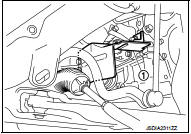
5. Remove transfer gusset (1).
6. Remove catalyst convertor upport bracket rear. EM-59, "4WD : Removal and Installation".
7. Remove rear torque rod and rear torque rod bracket. Refer to EM-59, "4WD : Removal and Installation".
8. Remove the mounting bolts of transaxle assembly and transfer assembly.
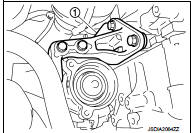
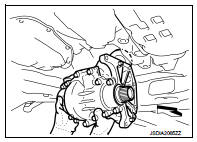
9. Remove transfer assembly from the vehicle.
 : Vehicle front
CAUTION:
Never damage ring gear shaft.
INSTALLATION
Note the following, and install in the reverse order of removal.
• When installing the transfer to the transaxle, install the mounting bolts following the standard below.
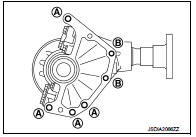

CAUTION:
• When installing transfer assembly to transaxle assembly,
replace the side oil seal (transfer joint). Refer to TM-292,
"Removal and Installation".
• Never damage side oil seal (the joint part of transfer).
• When installing heat insulator (1), install the mounting bolts and nut following procedure.

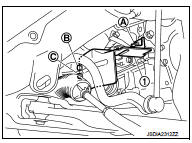
• Check oil level and check for oil leakage after installation. Refer to DLN-90, "Inspection".
 Exploded View
1. Transfer gusset
2. Transfer assembly
3. Heat insulator
: Vehicle front
: N·m (kg-m, ft-lb)
...

Other materials:
Hazard function
Component Function Check
1.CHECK FUNCTION
1. Select “MULTI REMOTE ENT� of “BCM� using CONSULT-III.
2. Select “FLASHER� in “ACTIVE TEST� mode.
3. Check that the function operates normally according to the following
conditions.
Is the inspection result normal?
YES >> Ha ...
Precautions on child restraints
WARNING
Failure to strictly adhere to the warnings and detailed instructions regarding the proper use and installation of child restraints can result in severe injury or death to a child or other occupants during a collision or emergency bra ...
Front bumper
Exploded View
1. Front side grille RH
2. Front side grille LH
3. Bumper side bracket RH
4. Front center grille
5. Emblem
6. Bumper reinforcement
7. Energy absorber
8. Bumper end rubber RH
9. Bumper fascia
10. Screw grommet
11. Bumper bracket cover
12. License plate bracket
13. ...
