
Nissan Juke Service and Repair Manual : Remote keyless entry receiver
Component Function Check
1.CHECK FUNCTION
1. Select “DOOR LOCK� of “BCM� using CONSULT-III.
2. Select “KEYLESS � or “KEYLESS UNLOCK� in “DATA MONITOR� mode.
3. Check that the function operates normally according to the following conditions.

It the inspection result normal? YES >> Remote keyless entry receiver is OK.
NO >> Refer to DLK-404, "Diagnosis Procedure".
Diagnosis Procedure
1.CHECK REMOTE KEYLESS ENTRY RECEIVER GROUND CIRCUIT
1. Turn ignition switch OFF.
2. Disconnect BCM connector and remote keyless entry receiver connector.
3. Check continuity between BCM harness connector and remote keyless entry receiver harness connector.

4. Check continuity between BCM harness connector and ground.

Is the inspection result normal? YES >> GO TO 2.
NO >> Repair or replace harness.
2.CHECK REMOTE KEYLESS ENTRY RECEIVER POWER SUPPLY
1. Reconnect BCM connector.
2. Check voltage between remote keyless entry receiver harness connector and ground.

Is the inspection result normal? YES >> GO TO 4.
NO >> GO TO 3.
3.CHECK REMOTE KEYLESS ENTRY RECEIVER CIRCUIT 1
1. Disconnect BCM connector 2. Check continuity between BCM harness connector and remote keyless entry receiver harness connector.

3. Check continuity between BCM harness connector and ground.

Is the inspection result normal? YES >> Replace BCM. Refer to BCS-161, "Removal and Installation".
NO >> Repair or replace harness.
4.CHECK REMOTE KEYLESS ENTRY RECEIVER OUTPUT SIGNAL
1. Reconnect remote keyless entry receiver connector.
2. Check signal between remote keyless entry receiver harness connector and ground using oscilloscope.
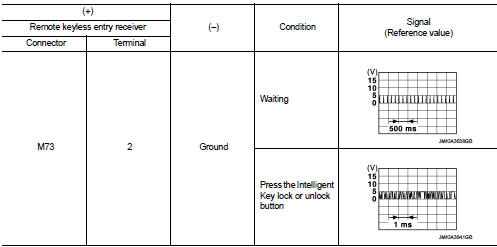
Is the inspection result normal? YES >> GO TO 5.
NO >> Replace remote keyless entry receiver.
5.CHECK REMOTE KEYLESS ENTRY RECEIVER CIRCUIT 2
1. Disconnect BCM connector and remote keyless entry receiver connector.
2. Check continuity between BCM harness connector and remote keyless entry receiver harness connector.

3. Check continuity between BCM harness connector and ground.

Is the inspection result normal? YES >> Replace BCM. Refer to BCS-161, "Removal and Installation".
NO >> Repair or replace harness.
 Keyfob battery
Component Function Check
1.CHECK FUNCTION
Check door lock and unlock operation with keyfob button.
Is the inspection result normal?
YES >> Keyfob is OK.
NO >> Refer to DLK-403, &q ...
 Super lock actuator
Driver side
DRIVER SIDE : Component Function Check
1.CHECK FUNCTION
1. Select “DOOR LOCK� of “BCM� using CONSULT-III.
2. Select “SUPER LOCK� in “ACTIVE TEST� mode.
3. Check that t ...
Other materials:
Engine coolant
Inspection
LEVEL
• Check that the reservoir tank engine coolant level is within the
“MIN� to “MAX� when the engine is cool.
A : MAX
B : MIN
• Adjust the engine coolant level if necessary.
LEAKAGE
• To check for leakage, apply pressure to the cooling system with the
radiator ...
How to use touch screen
CAUTION
• The glass screen on the liquid crystal display may break if it is hit with
a hard or sharp object. If the glass screen breaks, do not touch it.
Doing so could result in an injury.
• To clean the display, never use a rough cloth, alcohol, benzine, thinner or any
kind of solvent o ...
Parts Requiring Angle Tightening
• Use the angle wrench [SST: KV10112100] for the final tightening of the
following engine parts:
- Cylinder head bolts
- Lower cylinder block bolts
- Connecting rod cap bolts
- Crankshaft pulley bolt (No the angle wrench is required as bolt flange is
provided with notches for angle
tighte ...
