
Nissan Juke Owners Manual : Rear window wiper and washer switch
WARNING
In freezing temperatures the washer solution may freeze on the rear window glass and obscure your vision. Warm the rear window with the defroster before you wash the rear window.
CAUTION
• Do not operate the washer continuously for more than 30 seconds.
• Do not operate the washer if the reservoir tank is empty.
• Do not fill the window washer reservoir tank with washer fluid concentrates at full strength. Some methyl alcohol based washer fluid concentrates may permanently stain the grille if spilled while filling the window washer reservoir tank.
• Pre-mix washer fluid concentrates with water to the manufacturer’s recommended levels before pouring the fluid into the window washer reservoir tank. Do not use the window washer reservoir tank to mix the washer fluid concentrate and water.
If the rear window wiper operation is interrupted by snow or ice, the wiper may stop moving to protect its motor. If this occurs, turn the wiper switch to the OFF position and remove the snow or ice that is on and around the wiper arms. In approximately 1 minute, turn the switch on again to operate the wiper.
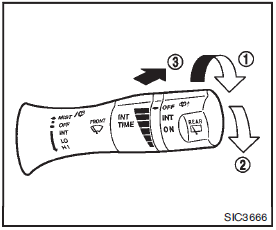
The rear window wiper and washer operate when the ignition switch is in the ON position.
Turn the switch clockwise from the OFF position to operate the wiper.
1 Intermittent (INT) — intermittent operation (not adjustable) 2 Low (ON) — continuous low speed operation
Push the switch forward 3 to operate the washer. Then the wiper will also operate several times.
 Windshield wiper and washer switch
WARNING
In freezing temperatures the washer solution may freeze on the windshield
and obscure your vision which may lead to an accident. Warm windshield with the
defroster before you wash the win ...
 Rear window and outside mirror defroster switch
Type A
Type B
To defog/defrost the rear window glass and outside mirrors (if so equipped),
start the engine and push the switch 1 on. The indicator light 2 will illuminate.
Push the switch a ...
Other materials:
Power window main switch
Reference Value
TERMINAL LAYOUT
PHYSICAL VALUES
POWER WINDOW MAIN SWITCH
Fail Safe
FAIL-SAFE CONTROL
Switches to fail-safe control when malfunction is detected in encoder signal
that detects up/down speed and
direction of door glass. Switches to fail-safe control when error beyond
r ...
Glow plug
Exploded View
1. Glow plug
Engine front
: N·m (kg-m, ft-lb)
Removal and Installation
REMOVAL
CAUTION:
Remove glow plug only if necessary. If carbon adheres, it may be stuck and
broken.
1. Disconnect the battery cable from the negative terminal.
2. Remove cowl top extension. Refer to E ...
B27A0, B27A1 intake door motor
DTC Logic
DTC DETECTION LOGIC
NOTE:
• If DTC is displayed along with DTC U1000, first perform the trouble diagnosis
for DTC U1000. Refer to HAC-
51, "DTC Logic".
• If DTC is displayed along with DTC U1010, first perform the trouble diagnosis
for DTC U1010. HAC-52,
"DTC L ...
