
Nissan Juke Service and Repair Manual : Rear washer nozzle and tube
Hydraulic Layout
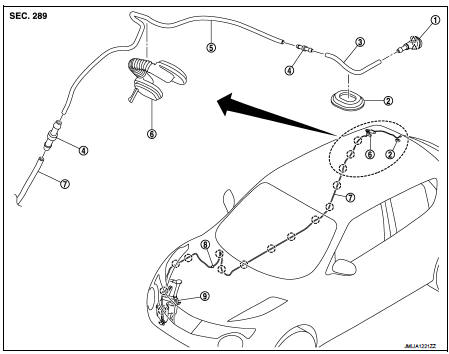
1. Rear washer nozzle
2. Plug
3. Rear washer tube
4. Joint
5. Second washer tube
6. Back door seal rubber
7. Front washer tube
 : Clip
 : Pawl
Removal and Installation
REMOVAL
1. Remove luggage side upper finisher RH. Refer to INT-32, "LUGGAGE SIDE UPPER FINISHER : Removal and Installation".
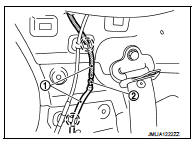
2. Disconnect rear washer tube (2) fixing clip and then remove rear washer tube joint (2) from rear washer tube.
 : Clip
3. Fully open back door.
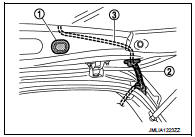
4. Remove back door seal rubber (2), and then remove rear washer tube (3) from back door seal rubber.
5. Remove plug (1).
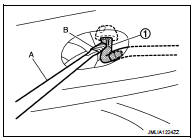
6. Disengage rear washer nozzle (1) fixing pawl with a flat-bladed screwdriver (A) and remove the rear washer nozzle.
CAUTION:
Wrap the flat-bladed screwdriver into a protective tape (B)
to protect the part from damage.
7. Remove rear washer nozzle from the rear washer tube.
INSTALLATION
Install in the reverse order of removal.
Inspection and Adjustment
INSPECTION
Washer Nozzle Inspection Check that air can pass through the hose by blowing forward (toward the nozzle), and check that air cannot pass through by sucking.
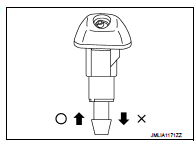
ADJUSTMENT
Washer Nozzle Spray Position adjustment Adjust spray positions to match the positions shown in the figure
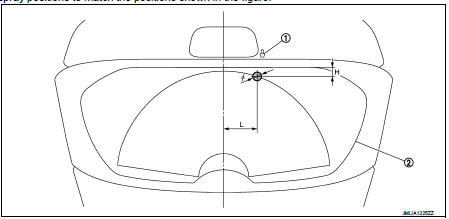
1. Rear washer nozzle 2. Black print frame line

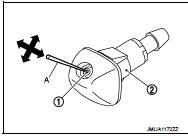
Insert a needle or similar object (A) into the spray opening (1) and move up/down and left/right to adjust the spray position.
NOTE
:
If wax or dust gets into the spray opening of rear washer nozzle (2),
remove wax or dust with a needle or small pin.
 Rear wiper motor
Exploded View
1. Rear wiper motor
2. Rear wiper blade
3. Rear wiper arm
4. Rear wiper arm cover
5. Rear wiper pivot seal
A : Model for cold areas
: Pawl
: N·m (kg-m, in-lb)
: N·m (kg-m ...
 Defogger
...
Other materials:
Rear window defogger system
Wiring Diagram - DEFOGGER CONTROL SYSTEM -
For connector terminal arrangements, harness layouts, and alphabets in a
(option abbreviation; if not
described in wiring diagram), refer to GI-12, "Connector Information/Explanation
of Option Abbreviation".
...
High-mounted stop lamp
Exploded View
1. High-mounted stop lamp
2. Seal packing
: N·m (kg-m, in-lb)
Removal and Installation
CAUTION:
Disconnect battery negative terminal or remove the fuse.
REMOVAL
1. Remove blind seal from back door inside.
CAUTION:
Be careful not to damage the blind seal, so that it can ...
Handling for Adhesive and Primer
• Never use an adhesive that is past its usable date. Shelf life of this
product is limited to six months after the
date of manufacture. Carefully adhere to the expiration or manufacture date
printed on the box.
• Keep primers and adhesive in a cool, dry place. Ideally, they should be stor ...
