
Nissan Juke Service and Repair Manual : Rear door lock
Exploded View
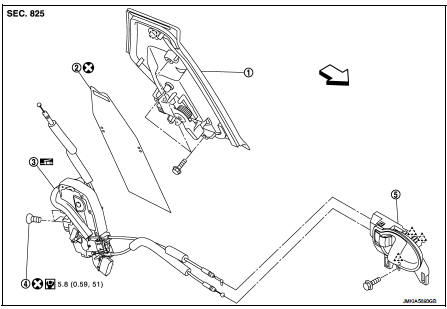
1. Outside handle assembly
2. Rear door sealing screen
3. Door lock assembly
4. TORX bolt
5. Inside handle
 : Clip
 : Pawl
 : Vehicle front
 : Do not reuse
 : N·m (kg-m, in-lb)
 : Body grease
Door lock
DOOR LOCK : Removal and Installation
REMOVAL
1. Remove rear door glass and rear door lower sash (rear). Refer to GW-21, "Removal and Installation".
2. Remove inside handle. Refer to DLK-343, "INSIDE HANDLE : Removal and Installation".
3. Remove outside handle. Refer to DLK-343, "OUTSIDE HANDLE : Removal and Installation".
4. Remove door lock assembly TORX bolts.
5. Disconnect door lock actuator connector, and then remove door lock assembly.
INSTALLATION
Note the following items, and install in the reverse order of removal.
CAUTION:
• Never reuse TORX bolt. Always replace it with a new one when it is removed.
• Check door open/close, lock/unlock operation after installation.
• Check door lock assembly for poor lubrication. Apply body grease to door lock if necessary.
 : Grease up point
Inside handle
INSIDE HANDLE : Removal and Installation
REMOVAL
1. Remove rear door finisher. Refer to INT-16, "Removal and Installation".
2. Remove upper side of sealing screen.
NOTE
:
Cut the butyl tape so that some parts of the butyl tape do not remain on the
sealing screen, if the sealing
screen is reused.
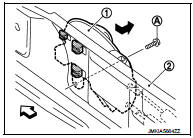
3. Remove inside handle mounting bolt (A).
4. Disengage inside handle (1) from door panel (2) while sliding inside handle toward vehicle rear, and then separate inside handle.
 : Vehicle front
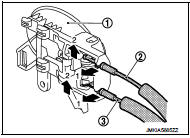
5. Disengage inside handle cable (3) and lock knob cable (2), and then remove inside handle (1).
INSTALLATION
Note the following item, and install in the reverse order of removal.
CAUTION:
Check door open/close, lock/unlock operation after installation.
Outside handle
OUTSIDE HANDLE : Removal and Installa
REMOVAL
1. Remove rear door finisher and rear door corner cover inner. Refer to INT-16, "Removal and Installation".
2. Remove rear door sealing screen.
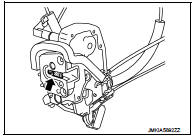
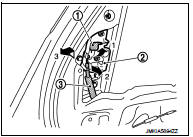
3. Rotate stopper (1) upward.
4. Disengage outside handle cable (2), and then remove outside handle cable from outside handle assembly (3).
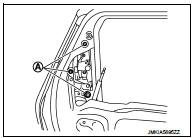
5. Remove outside handle assembly mounting bolts (A).
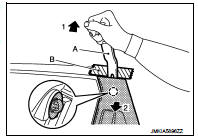
6. Disengage mounting clips using a remover tool (A), and then remove outside handle assembly.
CAUTION:
Apply protective tape (B) on the door panel to protect the
painted surface from damage.
 : Clip
INSTALLATION
Note the following items, and install in the reverse order of removal.
CAUTION:
• Never reuse rear door sealing screen. Always replace it with a new one when it
is removed.
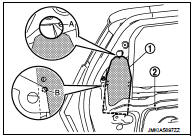
When installing rear door sealing screen, install it according to the following procedure.
- Put lower portion of rear door sealing screen (1) into inside of door panel (2).
- Perform positioning according to the following procedure, and then install rear door sealing screen.
• Align upper portion of rear door sealing screen to hole (A) of door panel as shown in the figure.
• Align hole of rear door sealing screen to edge (B) of door panel as shown in the figure.
• Be careful to position outside handle cable normally when installing it. For details, refer to DLK-342, "Exploded View".
• Check door open/close, lock/unlock operation after installation.
 Front door lock
Exploded View
1. Door key cylinder assembly (driver
side)
Outside handle escutcheon (passenger
side)
2. Rear gasket
3. Outside handle bracket
4. TORX bolt
5. Key rod (driver side)
6. Doo ...
 Back door lock
Exploded View
1. Back door lock assembly
2. TORX bolt
3. Back door striker
: Do not reuse
: N·m (kg-m, ft-lb)
: Body grease
Door lock
DOOR LOCK : Removal and Installation
REMOVAL
1. Remo ...
Other materials:
Insufficient heating
Description
Symptom
• Insufficient heating
• No warm air comes out. (Air flow volume is normal.)
Diagnosis Procedure
NOTE:
Perform self-diagnoses with CONSULT-III before performing symptom diagnosis. If
any DTC is detected, perform
the corresponding diagnosis.
1.CHECK COOLING SYSTEM
...
How to set SRT code
Description
OUTLINE
In order to set all SRTs, the self-diagnoses as in the “SRT ITEM� table must
have been performed at least
once. Each diagnosis may require actual driving for a long period of time under
various conditions.
SRT ITEM
The table below shows required self-diagnostic ite ...
P0001 fuel pump
DTC Logic
DTC DETECTION LOGIC
NOTE:
If DTC P0001 is displayed with DTC P0560 or P0657, first perform trouble
diagnosis for DTC P0560 or P0657.
Refer to EC-963, "DTC Logic" (DTC P0560) or EC-976, "DTC Logic" (DTC P0657).
Diagnosis Procedure
1.CHECK HIGH PRESSURE SUPPLY ...
