
Nissan Juke Service and Repair Manual : Rear disc brake
Brake pad : Inspection and Adj
INSPECTION
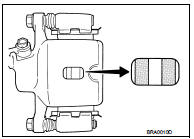
Check brake pad wear thickness from an inspection hole on cylinder body. Check using a scale if necessary.
Wear thickness : Refer to BR-137, "Rear Disc Brake".
ADJUSTMENT
Burnish contact surfaces between disc rotor and brake pads according to the following procedure after refinishing or replacing brake pads, or if a soft pedal occurs at very low mileage.
CAUTION:
• Be careful of vehicle speed because the brake does not operate firmly/securely
until pads and disc
rotor are securely fitted.
• Only perform this procedure under safe road and traffic conditions. Use extreme caution.
1. Drive vehicle on straight, flat road.
2. Depress brake pedal with the power to stop vehicle within 3 to 5 seconds until the vehicle stops.
3. Drive without depressing brake for a few minutes to cool the brake.
4. Repeat steps 1 to 3 until pad and disc rotor are securely fitted.
Disc rotor : Inspection and Adjustment
INSPECTION
Appearance
Check surface of disc rotor for uneven wear, cracks, and serious damage. Replace
it if necessary.
• 2WD: Refer to RAX-5, "Removal and Installation".
• 4WD: Refer to RAX-14, "Removal and Installation".
Runout
1. Fix the disc rotor to the wheel hub and bearing assembly with
wheel nuts (2 points at least).
2. Check the wheel bearing axial end play before the inspection.
• 2WD: Refer to RAX-4, "Inspection".
• 4WD: Refer to RAX-12, "Inspection".
3. Inspect the runout with a dial indicator to measure at 10 mm (0.39 in) inside the disc edge.
Runout (with it attached to the vehicle) : Refer to BR-137, "Rear Disc Brake".
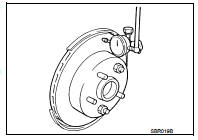
4. Find the installation position that has a minimum runout by shifting the disc rotor-to-wheel hub and bearing assembly installation position by one hole at a time if the runout exceeds the limit value.
• Refinish the disc rotor if the runout is outside the limit even after performing the above operation.
CAUTION:
• Check in advance that the thickness of the disc rotor is wear thickness + 0.3
mm (0.012 in) or more.
• If the thickness is less than wear thickness + 0.3 mm (0.012 in), replace the disc rotor.
- 2WD: Refer to RAX-5, "Removal and Installation".
- 4WD: Refer to RAX-14, "Removal and Installation".
Wear thickness : Refer to BR-137, "Rear Disc Brake".
Thickness
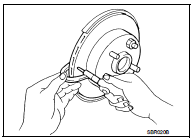
Check the thickness of the disc rotor using a micrometer. Replace
the disc rotor if the thickness is below the wear limit.
• 2WD: Refer to RAX-5, "Removal and Installation".
• 4WD: Refer to RAX-14, "Removal and Installation".
Wear thickness : Refer to BR-137, "Rear Disc Brake".
ADJUSTMENT
Burnish contact surfaces between disc rotors and brake pads according to the following procedure after refinishing or replacing disc rotor, or if a soft pedal occurs at very low mileage.
CAUTION:
• Be careful of vehicle speed because the brake does not operate firmly/securely
until pad and disc
rotor are securely fitted.
• Only perform this procedure under safe road and traffic conditions. Use extreme caution.
1. Drive vehicle on straight, flat road.
2. Depress brake pedal with the power to stop vehicle within 3 to 5 seconds until the vehicle stops.
3. Drive without depressing brake for a few minutes to cool the brake.
4. Repeat steps 1 to 3 until pad and disc rotor are securely fitted.
 Front disc brake
Brake pad : Inspection and Adjustment
INSPECTION
Check brake pad wear thickness from an inspection hole on cylinder
body. Check using a scale if necessary.Wear thickness : Refer to BR-137, "Fr ...

Other materials:
P0603 ECM power supply
DTC Logic
DTC DETECTION LOGIC
DTC CONFIRMATION PROCEDURE
1.PRECONDITIONING
If DTC Confirmation Procedure has been previously conducted, always perform
the following procedure
before conducting the next test.
1. Turn ignition switch OFF and wait at least 10 seconds.
2. Turn ignition swit ...
Vehicle Security System
The vehicle security system provides visual and audio alarm signals if someone
opens the doors, or lift gate when the system is armed. It is not, however, a motion
detection type system that activates when a vehicle is moved or when a vibration
occurs.
The system helps deter vehicle theft but ...
General maintenance
Throughout the daily operation of your vehicle, performing general maintenance at the intervals described in this section is vital for long-term reliability. Should you notice any unusual acoustic feedback, vibrations, or strange odors while driving your Nissan Leaf, be sure to investigate the sourc ...
