
Nissan Juke Service and Repair Manual : Primary speed sensor
Exploded View
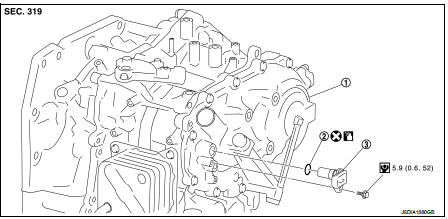
1. Transaxle assembly
2. O-ring
3. Primary speed sensor
 : Always replace after every
disassembly.
 : N m (kg-m, in-lb)
 : Genuine NISSAN CVT Fluid NS-2
Removal and Installation
REMOVAL
1. Remove the battery. Refer to PG-124, "Removal and Installation".
2. Remove the air cleaner case. Refer to EM-161, "Removal and Installation".
3. Remove the ECM and bracket as a set.
4. Disconnect the primary speed sensor connector.
5. Remove the primary speed sensor.
6. Remove the O-ring from the primary speed sensor.
INSTALLATION
Note the following, and install in the reverse order of removal.
CAUTION:
• Never reuse O-ring.
• Apply Genuine NISSAN CVT Fluid NS-2 to the O-ring.
Inspection and Adjustment
INSPECTION AFTER INSTALLATION Check for CVT fluid leakage. Refer to TM-480, "Inspection".
ADJUSTMENT AFTER INSTALLATION Adjust the CVT fluid level. Refer to TM-379, "Adjustment".
 Oil pan
Exploded View
1. Transaxle assembly
2. Oil pan gasket
3. Magnet
4. Oil pan
5. Overflow tube
6. Drain plug gasket
7. Drain plug
8. Oil pan fitting bolt
: Always replace after every
di ...
 Secondary speed sensor
Exploded View
1. Transaxle assembly
2. O-ring
3. Secondary speed sensor
: Vehicle front
: Always replace after every
disassembly.
: N·m (kg-m, in-lb)
: Genuine NISSAN CVT Fluid NS-2
Rem ...
Other materials:
Vehicle speed sensing auto lock operation does not operate
Diagnosis Procedure
1.CHECK “AUTOMATIC LOCK/UNLOCK SELECT� SETTING IN “WORK SUPPORT�
1. Select “DOOR LOCK� of “BCM� using CONSULT-III.
2. Select “AUTOMATIC LOCK/UNLOCK SELECT� in “WORK SUPPORT� mode.
3. Check “AUTOMATIC LOCK/UNLOCK SELECT� in “WORK SUPPORT�.
Re ...
Door does not lock/unlock with door request switch
All door request switches
ALL DOOR REQUEST SWITCHES : Description
All doors do not lock/unlock using all door request switches.
ALL DOOR REQUEST SWITCHES : Diagnosis Procedure
1.CHECK REMOTE KEYLESS ENTRY FUNCTION
Check remote keyless entry function.
Does door lock/unlock with Intelligent Ke ...
Automatic climate control
(models without Navigation System)
fan speed control dial
intake air control
button
front defroster button
Climate Ctrl. display (dedicated monochromatic status screen for reading target t ...
