
Nissan Leaf 2018-2025 (ZE1) Owner's Manual : Precautions on cruise control
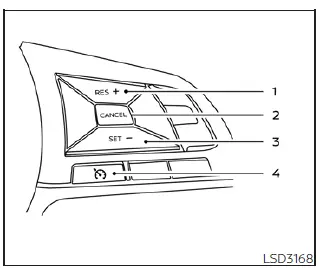
- RES+ switch
- CANCEL switch
- SET- switch
- Cruise control switch
- If the cruise control system detects an internal fault or operational anomaly, it will deactivate automatically to maintain vehicle safety. The dedicated cruise
 indicator in the vehicle information display will then begin to blink, serving as a clear warning to the driver that the system is no longer active.
- Should you notice the cruise
 indicator
blinking, immediately turn the main cruise control switch off. It is essential to have the system inspected by a qualified professional; we recommend visiting a NISSAN certified LEAF dealer to ensure the diagnostic and repair processes meet factory standards.
indicator
blinking, immediately turn the main cruise control switch off. It is essential to have the system inspected by a qualified professional; we recommend visiting a NISSAN certified LEAF dealer to ensure the diagnostic and repair processes meet factory standards.
- The cruise
 indicator may also blink if the cruise control switch is toggled on while simultaneously pressing the RES+, SET-, or CANCEL switches. To ensure the Nissan Leaf cruise control system engages correctly, please follow the designated operational procedures outlined below.
WARNING
Do not use the cruise control when driving under the following conditions:
- When it is not possible to keep the Nissan Leaf at a steady, set speed due to traffic flow or road conditions.
- In heavy, congested traffic or in scenarios where traffic speed varies significantly, requiring frequent driver intervention.
- On winding, twisting, or excessively hilly roads where consistent speed maintenance is challenging.
- On slippery or low-traction road surfaces, including those affected by heavy rain, deep snow, or black ice, where cruise control could cause a loss of stability.
- In areas with very strong, gusty winds that may affect vehicle handling.
Failure to observe these precautions could cause a loss of vehicle control, potentially resulting in an accident.
 Cruise control
...
 Cruise control operations
The Nissan Leaf cruise control system is designed to provide a comfortable driving experience by allowing you to maintain a set speed between 25 to 90 mph (40 to 144 km/h) without the need to keep you ...
Other materials:
P0335 CKP sensor (POS)
DTC Logic
DTC DETECTION LOGIC
DTC CONFIRMATION PROCEDURE
1.PRECONDITIONING
If DTC Confirmation Procedure has been previously conducted, always turn
ignition switch OFF and wait at
least 10 seconds before conducting the next test.
TESTING CONDITION:
Before performing the following proced ...
P1641 thermoplunger control unit
DTC Logic
DTC DETECTION LOGIC
Diagnosis Procedure
1.CHECK THERMOPLUNGER CONTROL UNIT POWER SUPPLY CIRCUIT
1. Turn ignition switch OFF.
2. Disconnect thermoplunger control unit harness connector.
3. Check the voltage between thermoplunger control unit harness connector and
ground.
Is the ...
Door mirror system (with intelligent key)
LHD
LHD : Wiring Diagram
For connector terminal arrangements, harness layouts, and alphabets in a
(option abbreviation; if not
described in wiring diagram), refer to GI-12, "Connector Information/Explanation
of Option Abbreviation".
RHD
RHD : Wiring Diagram
For connector termina ...
