
Nissan Juke Service and Repair Manual : P0641 sensor power supply
DTC Logic
DTC DETECTION LOGIC
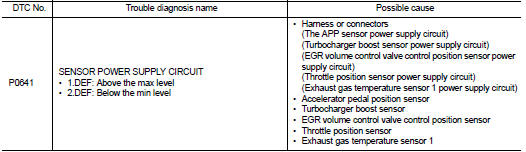
Diagnosis Procedure
1.CHECK GROUND CONNECTION
1. Turn ignition switch OFF.
2. Check ground connection E38. Refer to Ground Inspection in GI-44, "Circuit Inspection".
Is the inspection result normal? YES >> GO TO 2.
NO >> Repair or replace ground connection.
2.CHECK SENSOR POWER SUPPLY CIRCUITS
Check harness for short to power and short to ground, between the following terminals.
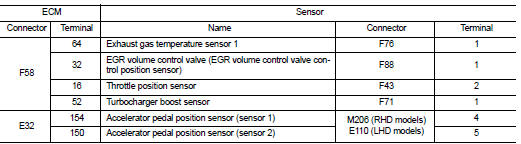
Is the inspection result normal? YES >> GO TO 3.
NO >> Repair short to ground or short to power in harness or connectors.
3.CHECK INTERMITTENT INCIDENT
Refer to GI-42, "Intermittent Incident", ???INCIDENT SIMULATION TESTS??? and ???GROUND INSPECTION???.
>> INSPECTION END
 P0638 electric throttle control actuator function
DTC Logic
DTC DETECTION LOGIC
NOTE:
If DTC P0638 is displayed with DTC P0120 or P2100, first perform trouble
diagnosis for DTC P0120 or P2100.
Refer to EC-909, "DTC Logic" (P0120), ...
 P0651 sensor power supply
DTC Logic
DTC DETECTION LOGIC
Diagnosis Procedure
1.CHECK GROUND CONNECTION
1. Turn ignition switch OFF.
2. Check ground connection E38. Refer to Ground Inspection in GI-44, "Circuit
Ins ...
Other materials:
Diagnosis system (bcm) (without intelligent key system)
Common item
COMMON ITEM : CONSULT-III Function (BCM - COMMON ITEM)
APPLICATION ITEM
CONSULT-III performs the following functions via CAN communication with BCM.
SYSTEM APPLICATION
BCM can perform the following functions for each system.
NOTE:
It can perform the diagnosis modes except the ...
Parking brake shoe
Exploded View
1. Anti-rattle pin
2. Back plate
3. Toggle lever
4. Parking brake shoe
5. Brake strut
6. Return spring
7. Spring
8. Adjuster
: Apply PBC (Poly Butyl
Cuprysil) grease or silicone-based grease.
Removal and Installation
REMOVAL
WARNING:
Clean any dust from the parkin ...
RearView monitor (if so equipped)
When the shift lever is shifted into the R (Reverse) position, the monitor display
shows the view to the rear of the vehicle.
The system is designed as an aid to the driver in situations such as slot parking
or parallel parking.
WARNING
Failure to follow the warnings and instructions for prop ...
